Tag: devops tutorials

  • DevOps vs SRE differences and when to use each

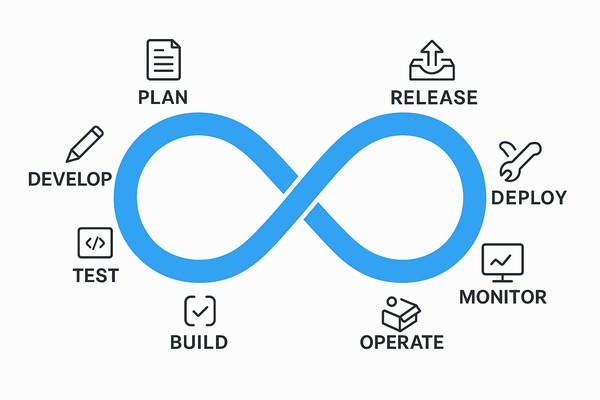
    DevOps and Site Reliability Engineering (SRE) have overlapping goals but differ significantly in focus, responsibilities, and approaches. we will see DevOps vs SRE differences in this article.

    Key Differences

    Focus:

    • DevOps focuses on the entire software development lifecycle, emphasizing collaboration between development and operations to deliver features quickly and reliably.
    • SRE focuses narrowly on system reliability, scalability, and stability in production, ensuring that changes do not increase failure rates or disrupt user experience.

    Responsibilities:

    • DevOps teams build and deploy new features, streamlining development and deployment pipelines with continuous integration and delivery practices.
    • SRE teams ensure production systems remain highly available and performant, using engineering practices to automate operations, monitor production, and handle incidents proactively.

    Objectives:

    • DevOps aims to accelerate product development and delivery to meet customer needs.
    • SRE aims to maintain service uptime and reliability, often setting and enforcing service-level objectives (SLOs) and error budgets.

    Team Structure:

    • DevOps teams integrate roles across software development and operations.
    • SRE teams consist of engineers skilled in both software and operations, focusing deeply on reliability engineering.

    Approach to Failures:

    • DevOps is more reactive, fixing problems as they appear and focusing on fast delivery.
    • SRE is proactive, analyzing root causes, performing chaos engineering, and preventing failures before they occur.

    When to Use Each

    • Use DevOps when you want to improve collaboration between development and operations, speed up software delivery, and implement continuous integration/delivery pipelines.
    • Use SRE when your priority is to maintain high reliability and availability of systems at scale, reduce downtime, and manage operational risk through data-driven reliability engineering practices.

    Main Differences: DevOps vs SRE

    FeatureDevOpsSRE
    Primary GoalSpeed & DeliveryReliability & Stability
    Main FocusEntire SDLC (plan → deploy)Production systems
    Mindset“Move fast”“Don’t break things”
    Approach to IssuesReactive + Continuous improvementProactive + Automated
    Key MetricsDeployment frequency, delivery timeUptime, error rate
    Who does it?Developers + Ops teamsSpecialized reliability engineers

    In essence, DevOps defines the broad culture and practices for faster development and deployment, while SRE applies engineering rigor to keep those deployed systems reliable in production. Organizations often integrate both for achieving fast, stable, and scalable software delivery

    Final Thoughts

    DevOps + SRE Better Together

    Here’s the secret:
    Most organizations don’t choose one over the other.

    DevOps = culture + speed
    SRE = discipline + reliability

    Together, they create a balanced system:

    • DevOps pushes updates quickly
    • SRE ensures updates don’t break the system

    Fast + Stable = Happy Users + Happy Business

    Next Steps :

  • AWS Well-Architected Framework: Building Reliable and Scalable Cloud Systems

    When we move our workloads to the cloud. it is not about spinning up servers or deploying apps.it is about building something that lasts forever. Something that’s secure, efficient and ready to scale as your business grows. That’s where the AWS Well-Architected Framework comes in.

    It helps cloud architects, developers and devops teams make better decisions while designing systems that are resilient, secure and optimized for performance and cost.


    What Is the AWS Well-Architected Framework?

    AWS Well-Architected Framework is a collection of key concepts, design principles and best practices for designing and running workloads in the cloud.


    The Six Pillars of AWS Well-Architected Framework

    The framework is built around six core pillars


    1. Operational Excellence

    Goal: Run and monitor systems effectively to deliver business value and continuously improve.
    This pillar focuses on automation, monitoring and incident response.
    You learn to document everything, evolve your procedures, and design systems that can be easily operated.

    Key takeaway: Build operations as code. Automate repetitive tasks and always keep improving.


    2. Security

    Goal: Protect data, systems and assets using cloud-native security practices.
    AWS encourages a defense-in-depth approach—secure every layer from identity and access to data encryption.

    Key takeaway: Security is everyone’s responsibility. Protect, detect and respond continuously.


    3. Reliability

    Goal: Ensure your workload performs correctly and consistently even when things go wrong.
    It’s all about resiliency, fault tolerance and disaster recovery. Design for failure because in the cloud, it’s inevitable, but manageable.

    Key takeaway: Don’t hope systems won’t fail design them to recover when they do.


    4. Performance Efficiency

    Goal: Use computing resources efficiently to meet system requirements and maintain performance as demand changes.
    This means choosing the right instance types, storage options and database solutions to optimize speed and scalability.

    Key takeaway: Continuously review and evolve your architecture as technology evolves.


    5. Cost Optimization

    Goal: Avoid unnecessary costs and maximize the business value from every dollar spent.
    AWS gives you visibility and tools like Cost Explorer and Budgets to monitor and control spending.

    Key takeaway: Pay only for what you use—and always look for smarter ways to save.


    6. Sustainability

    Goal: Minimize the environmental impact of your cloud workloads.
    This newer pillar focuses on using resources responsibly, choosing energy efficient regions and optimizing workloads to reduce carbon footprint.

    Key takeaway: Build green architectures that are efficient and sustainable for the planet.


    Why It Matters

    Applying the AWS Well-Architected Framework ensures your systems are resilient, cost-effective, and future-ready.
    Whether you’re a startup building your first cloud app or an enterprise migrating legacy workloads, this framework acts as your trusted compass in the cloud journey.

    By regularly reviewing your workloads against the six pillars, you’ll not only identify risks early but also make informed improvements that drive long-term success.


    Final Thoughts

    Cloud architecture isn’t just about deploying resources—it’s about building smart, secure, and sustainable systems.
    The AWS Well-Architected Framework provides the guidance to help you do exactly that balancing performance, cost, and reliability while keeping security and sustainability at the heart of it all.

    So the next time you design or review a workload, remember these six pillars — they’re not just best practices, they’re the foundation of every great cloud architecture

    What’s Next?

    The journey is ongoing. I’m glad to have you along for the ride.

    Devops tutorial :https://www.youtube.com/embed/6pdCcXEh-kw?si=c-aaCzvTeD2mH3Gv

  • 10 DevOps Projects You Can Build as a Beginner

    If you’re learning DevOps and want to build your resume, the best way to stand out is by building real projects. These projects show you understand tools like Docker, Jenkins, GitHub Actions, AWS, and Kubernetes — and can apply them to solve real problems.

    In this blog, we’ll look at 10 beginner-friendly DevOps projects that you can actually build and showcase on your GitHub profile.


    1. Personal Portfolio Website with CI/CD

    Use Case: Automate deployment every time you push code.

    Tools: GitHub, GitHub Actions, Netlify or AWS S3

    What You’ll Learn:

    • CI/CD pipelines
    • GitHub workflows
    • Hosting static websites

    2. Dockerize a Python/Node.js App

    Use Case: Package and run apps anywhere

    Tools: Docker, Docker Hub

    What You’ll Learn:

    • Dockerfile basics
    • Image creation
    • Container lifecycle

    3. Build a Jenkins CI/CD Pipeline

    Use Case: Automate build and test for your codebase

    Tools: Jenkins, Git, GitHub

    What You’ll Learn:

    • Jenkins pipeline creation
    • Webhooks integration
    • Testing automation

    4. Host a Static Website on AWS S3 with CloudFront CDN

    Use Case: Cost-effective global hosting

    Tools: AWS S3, CloudFront, Route 53

    What You’ll Learn:

    • AWS basics
    • DNS and CDN setup
    • Bucket permissions

    5. Deploy a Web App on Kubernetes (Minikube)

    Use Case: Run apps in containers managed by Kubernetes

    Tools: Docker, Kubernetes, Minikube

    What You’ll Learn:

    • Kubernetes YAML files
    • Pods, deployments, services
    • Port forwarding and load balancing

    6. Create Infrastructure Using Terraform

    Use Case: Provision servers with code

    Tools: Terraform, AWS

    What You’ll Learn:

    • Infrastructure as Code (IaC)
    • Creating EC2 and S3 buckets
    • Versioning infrastructure

    7. Monitor a Web App with Prometheus + Grafana

    Use Case: See real-time metrics and performance

    Tools: Prometheus, Grafana, Node Exporter

    What You’ll Learn:

    • Metrics collection
    • Building Grafana dashboards
    • Setting alerts

    8. Automated Backups with Cron and Shell Scripting

    Use Case: Keep daily backups of important data

    Tools: Bash, Cron, Linux

    What You’ll Learn:

    • Writing shell scripts
    • Setting cron jobs
    • File handling and compression

    9. CI/CD with GitLab Pipelines

    Use Case: End-to-end DevOps with GitLab

    Tools: GitLab, GitLab CI/CD

    What You’ll Learn:

    • Writing .gitlab-ci.yml
    • Running build and test jobs
    • Using GitLab runners

    10. Create a Resume Site with HTTPS and SSL using Nginx + Certbot

    Use Case: Secure, custom resume website

    Tools: Nginx, Ubuntu, Let’s Encrypt

    What You’ll Learn:

    • Nginx configuration
    • SSL certificate setup
    • Custom domain mapping

    Final Tips

    • Start with 1 or 2 simple projects
    • Push all code to GitHub with README files
    • Document everything you do
    • Deploy at least one project live
    • Add the best projects to your resume

    Even as a beginner, these projects can help you build confidence, prove your skills, and land interviews.

    Keep building. Keep growing.

    Next Steps