Have you ever opened a website and noticed the padlock icon in your browser? Or encountered an error such as certificate has expired, unable to verify the first certificate, or SSL certificate problem while using curl?
These situations are related to TLS, the security protocol used to protect communication between applications.
TLS certificate authentication is an important concept for anyone learning networking, Linux, DevOps, cloud computing, or application security.
In this guide, we will understand TLS certificates from the beginning, using simple examples.
1. What Is TLS?
TLS stands for Transport Layer Security.
It is a security protocol that helps applications communicate securely over a network.
TLS provides three important security properties:
- Encryption: Protects transmitted data from being read by unauthorized parties.
- Authentication: Helps verify the identity of the server and, when configured, the client.
- Integrity: Helps detect unauthorized modification of transmitted data.
For example, when you log in to a website, you do not want someone on the network to read your password. TLS helps protect that communication.
You may also hear the term SSL, which stands for Secure Sockets Layer. SSL is the older predecessor to TLS and is no longer considered secure for modern deployments. People still commonly say “SSL certificate,” but modern secure connections use TLS.
2. What Is a TLS Certificate?
Imagine that you receive a message from someone claiming to represent your bank. How do you know the message really comes from the bank?
On the internet, applications face a similar problem.
When your browser connects to https://example.com, it needs a way to verify that the server is authorized to represent that website.
A TLS certificate helps establish that identity.
A typical server certificate contains information such as:
- The domain names the certificate is valid for.
- The public key associated with the certificate.
- The certificate issuer.
- The validity period.
- A digital signature from the issuer.
A certificate is not a password, and it does not contain the server’s private key.
Instead, it binds an identity, such as a domain name, to a public key. The client checks whether it can trust that binding.
3. What Are Public and Private Keys?
TLS commonly uses asymmetric cryptography, which involves a public key and a corresponding private key.
Public key: Can be shared openly. It is included in the certificate.
Private key: Must remain secret and be protected by the server or the system responsible for using it.
Think of the public key as information everyone is allowed to know, while the private key is something only its authorized owner should control.
During a TLS handshake, the server proves possession of the corresponding private key through a cryptographic operation. The client can verify this using the public key in the certificate.
Importantly, in modern TLS, the certificate’s public key usually does not directly encrypt all the application data. TLS 1.3 commonly uses ephemeral key exchange to establish shared session keys, which are then used for efficient symmetric encryption.
4. Who Issues a TLS Certificate?
TLS certificates are commonly issued by Certificate Authorities, also known as CAs.
A Certificate Authority is an organization or service that issues certificates after applying its validation process.
For a publicly trusted website, the simplified process looks like this:
- The website operator generates a public and private key pair.
- The operator requests a certificate for the relevant domain.
- A Certificate Authority validates control of the domain or performs another required validation.
- The CA issues a certificate containing the public key and verified identity information.
- The website administrator configures the server to present the certificate.
When a browser connects, it checks the certificate and the chain of signatures leading to a trusted root certificate.
A browser or operating system typically maintains a collection of trusted root certificates. The exact trust store depends on the platform and application.
5. How Does TLS Certificate Authentication Work?
Let’s consider a simple example.
You open:
The process can be understood in these steps:
Step 1: The client initiates a connection.
Your browser starts a TLS handshake with the server.
Step 2: The server presents its certificate.
The server sends its certificate and, when needed, intermediate certificates that help establish the chain of trust.
Step 3: The client validates the certificate.
The browser or application checks several things, including:
- Is the certificate valid for the requested hostname?
- Is it within its validity period?
- Does the certificate chain lead to an accepted trust anchor?
- Are the signatures and other required constraints valid?
- Has the certificate been revoked, if the client performs a relevant revocation check?
The exact checks depend on the client, its configuration, and the certificate.
Step 4: The server proves possession of its private key.
The server provides cryptographic proof during the handshake that it possesses the private key corresponding to its certificate.
Step 5: The TLS handshake completes.
The client and server establish shared session keys and can begin exchanging protected application data.
If the required checks fail, the client may reject the connection or report a certificate error.
6. What Is the Difference Between One-Way TLS and Mutual TLS?
There are two common authentication arrangements.
One-way TLS
In a typical HTTPS connection, the server authenticates itself to the client using its certificate.
The client can then send requests over the protected connection. Application-level authentication may still be required for users or API consumers.
Mutual TLS (mTLS)
With mutual TLS, both sides authenticate using certificates.
The server presents its certificate to the client, and the client also presents a certificate that the server validates.
For example, in a service-to-service connection:
- Service A connects to Service B.
- Service B presents its server certificate.
- Service A verifies Service B’s identity.
- Service A presents its client certificate when requested.
- Service B validates Service A’s certificate and its authorization rules.
This can be useful in microservices, internal APIs, and zero-trust infrastructure.
A valid client certificate does not automatically mean the client is authorized to perform every action. Authorization remains a separate decision.
7. Why Do TLS Certificate Errors Occur?
TLS errors are common in production environments. Here are some frequent causes.
Expired certificate
The certificate is outside its validity period. Renew it and ensure the server presents the updated certificate.
Hostname mismatch
The certificate does not cover the hostname being accessed. Check the Subject Alternative Name (SAN) entries.
Untrusted certificate
The client cannot establish a trusted chain, perhaps because the certificate is self-signed or the relevant CA is missing from the trust store.
Missing intermediate certificate
The server does not present the intermediate certificate needed to build the chain. Configure the appropriate certificate chain.
Incorrect system time
A client or server with an incorrect clock may interpret certificates as not yet valid or expired.
Client certificate rejected
In an mTLS setup, the server may reject the client certificate because it is untrusted, expired, inappropriate for the intended use, or missing required identity information.
The right fix depends on the specific error. Avoid disabling certificate verification as a permanent workaround.
8. How Can You Inspect a TLS Certificate?
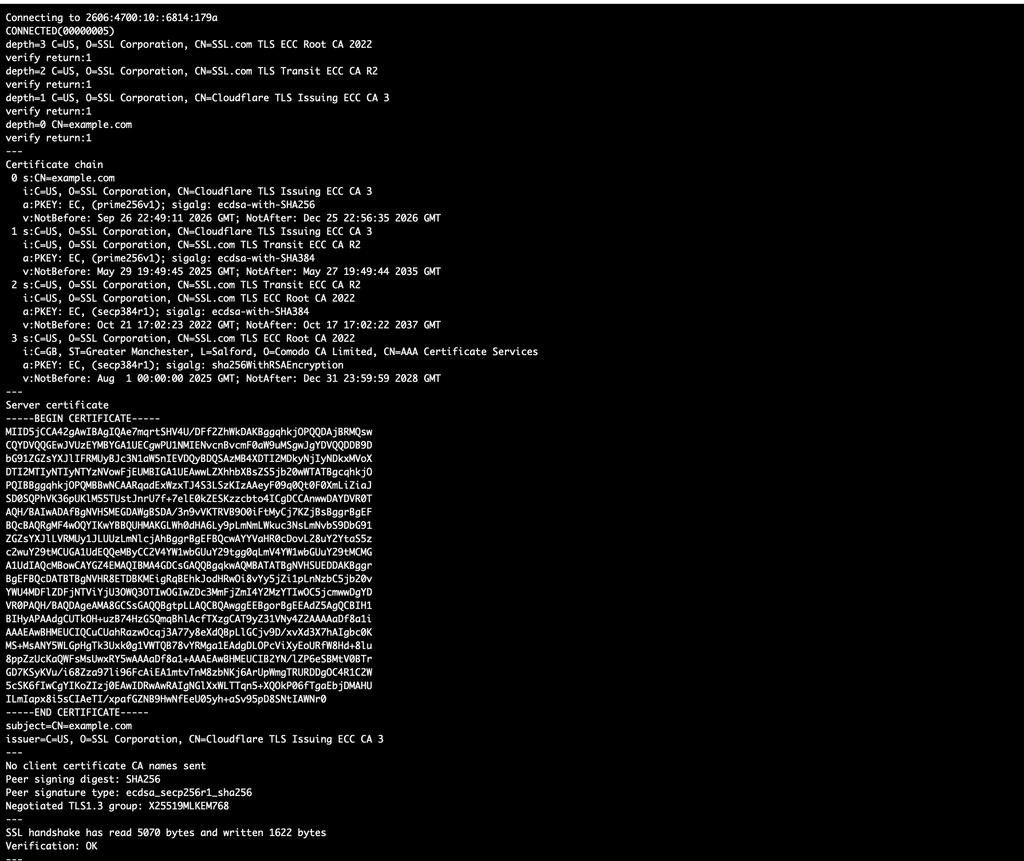
You can use OpenSSL to inspect a server’s certificate chain.
For example:
openssl s_client \
  -connect example.com:443 \
  -servername example.com \
  -showcerts
This command connects to the server on port 443 and displays the certificates presented during the handshake.
The -servername option supplies the Server Name Indication (SNI) hostname, which helps the server select the appropriate certificate when hosting multiple domains.
You can also use curl to test HTTPS:
curl -Iv https://example.comThis displays connection and TLS-related diagnostic information. The -I option requests response headers, while -v enables verbose output.
For certificate inspection, you can also use:
openssl s_client \
  -connect example.com:443 \
  -servername example.com \
  </dev/null 2>/dev/null |
openssl x509 -noout -subject -issuer -dates
This displays the subject, issuer, and validity dates of the first certificate returned by the command pipeline.
Replace example.com with a hostname you are authorized to test. These examples assume the relevant tools are installed and that the host is reachable.
9. Why Should DevOps Engineers Understand TLS?
TLS is used throughout modern infrastructure.
You may encounter it when working with:
- Nginx and Apache web servers.
- Kubernetes Ingress and service meshes.
- API gateways and load balancers.
- Cloud-hosted applications.
- Container registries and CI/CD systems.
- Internal service-to-service communication.
- Monitoring systems and secured APIs.
A certificate issue can cause application health checks to fail, deployments to break, API calls to stop working, or services to lose connectivity.
Understanding certificate validation and knowing how to inspect a handshake makes troubleshooting faster and more reliable.
Conclusion
TLS certificate authentication is the process of using certificates and cryptographic proof to establish trust in the identity of a communicating party.
The most important concepts to remember are:
- A certificate binds an identity to a public key.
- A private key must be kept secure.
- Certificate Authorities help establish trust.
- Clients validate certificate chains and identities.
- Mutual TLS allows both the client and server to authenticate.
- Tools such as
curlandopensslhelp diagnose certificate problems.
Start with these fundamentals before moving on to handshake internals, certificate chains, and mutual TLS troubleshooting.
Next article: How Does a TLS Handshake Work? A Step-by-Step Guide for Beginners.
Leave a Reply