Tag: devops

  • DevOps vs SRE differences and when to use each

    DevOps and Site Reliability Engineering (SRE) have overlapping goals but differ significantly in focus, responsibilities, and approaches. we will see DevOps vs SRE differences in this article.

    Key Differences

    Focus:

    • DevOps focuses on the entire software development lifecycle, emphasizing collaboration between development and operations to deliver features quickly and reliably.
    • SRE focuses narrowly on system reliability, scalability, and stability in production, ensuring that changes do not increase failure rates or disrupt user experience.

    Responsibilities:

    • DevOps teams build and deploy new features, streamlining development and deployment pipelines with continuous integration and delivery practices.
    • SRE teams ensure production systems remain highly available and performant, using engineering practices to automate operations, monitor production, and handle incidents proactively.

    Objectives:

    • DevOps aims to accelerate product development and delivery to meet customer needs.
    • SRE aims to maintain service uptime and reliability, often setting and enforcing service-level objectives (SLOs) and error budgets.

    Team Structure:

    • DevOps teams integrate roles across software development and operations.
    • SRE teams consist of engineers skilled in both software and operations, focusing deeply on reliability engineering.

    Approach to Failures:

    • DevOps is more reactive, fixing problems as they appear and focusing on fast delivery.
    • SRE is proactive, analyzing root causes, performing chaos engineering, and preventing failures before they occur.

    When to Use Each

    • Use DevOps when you want to improve collaboration between development and operations, speed up software delivery, and implement continuous integration/delivery pipelines.
    • Use SRE when your priority is to maintain high reliability and availability of systems at scale, reduce downtime, and manage operational risk through data-driven reliability engineering practices.

    Main Differences: DevOps vs SRE

    FeatureDevOpsSRE
    Primary GoalSpeed & DeliveryReliability & Stability
    Main FocusEntire SDLC (plan → deploy)Production systems
    Mindset“Move fast”“Don’t break things”
    Approach to IssuesReactive + Continuous improvementProactive + Automated
    Key MetricsDeployment frequency, delivery timeUptime, error rate
    Who does it?Developers + Ops teamsSpecialized reliability engineers

    In essence, DevOps defines the broad culture and practices for faster development and deployment, while SRE applies engineering rigor to keep those deployed systems reliable in production. Organizations often integrate both for achieving fast, stable, and scalable software delivery

    Final Thoughts

    DevOps + SRE Better Together

    Here’s the secret:
    Most organizations don’t choose one over the other.

    DevOps = culture + speed
    SRE = discipline + reliability

    Together, they create a balanced system:

    • DevOps pushes updates quickly
    • SRE ensures updates don’t break the system

    Fast + Stable = Happy Users + Happy Business

    Next Steps :

  • AWS Well-Architected Framework: Building Reliable and Scalable Cloud Systems

    When we move our workloads to the cloud. it is not about spinning up servers or deploying apps.it is about building something that lasts forever. Something that’s secure, efficient and ready to scale as your business grows. That’s where the AWS Well-Architected Framework comes in.

    It helps cloud architects, developers and devops teams make better decisions while designing systems that are resilient, secure and optimized for performance and cost.


    What Is the AWS Well-Architected Framework?

    AWS Well-Architected Framework is a collection of key concepts, design principles and best practices for designing and running workloads in the cloud.


    The Six Pillars of AWS Well-Architected Framework

    The framework is built around six core pillars


    1. Operational Excellence

    Goal: Run and monitor systems effectively to deliver business value and continuously improve.
    This pillar focuses on automation, monitoring and incident response.
    You learn to document everything, evolve your procedures, and design systems that can be easily operated.

    Key takeaway: Build operations as code. Automate repetitive tasks and always keep improving.


    2. Security

    Goal: Protect data, systems and assets using cloud-native security practices.
    AWS encourages a defense-in-depth approach—secure every layer from identity and access to data encryption.

    Key takeaway: Security is everyone’s responsibility. Protect, detect and respond continuously.


    3. Reliability

    Goal: Ensure your workload performs correctly and consistently even when things go wrong.
    It’s all about resiliency, fault tolerance and disaster recovery. Design for failure because in the cloud, it’s inevitable, but manageable.

    Key takeaway: Don’t hope systems won’t fail design them to recover when they do.


    4. Performance Efficiency

    Goal: Use computing resources efficiently to meet system requirements and maintain performance as demand changes.
    This means choosing the right instance types, storage options and database solutions to optimize speed and scalability.

    Key takeaway: Continuously review and evolve your architecture as technology evolves.


    5. Cost Optimization

    Goal: Avoid unnecessary costs and maximize the business value from every dollar spent.
    AWS gives you visibility and tools like Cost Explorer and Budgets to monitor and control spending.

    Key takeaway: Pay only for what you use—and always look for smarter ways to save.


    6. Sustainability

    Goal: Minimize the environmental impact of your cloud workloads.
    This newer pillar focuses on using resources responsibly, choosing energy efficient regions and optimizing workloads to reduce carbon footprint.

    Key takeaway: Build green architectures that are efficient and sustainable for the planet.


    Why It Matters

    Applying the AWS Well-Architected Framework ensures your systems are resilient, cost-effective, and future-ready.
    Whether you’re a startup building your first cloud app or an enterprise migrating legacy workloads, this framework acts as your trusted compass in the cloud journey.

    By regularly reviewing your workloads against the six pillars, you’ll not only identify risks early but also make informed improvements that drive long-term success.


    Final Thoughts

    Cloud architecture isn’t just about deploying resources—it’s about building smart, secure, and sustainable systems.
    The AWS Well-Architected Framework provides the guidance to help you do exactly that balancing performance, cost, and reliability while keeping security and sustainability at the heart of it all.

    So the next time you design or review a workload, remember these six pillars — they’re not just best practices, they’re the foundation of every great cloud architecture

    What’s Next?

    The journey is ongoing. I’m glad to have you along for the ride.

    Devops tutorial :https://www.youtube.com/embed/6pdCcXEh-kw?si=c-aaCzvTeD2mH3Gv

  • Essential Ports and Protocols Every DevOps Engineer Should Know

    As a DevOps engineer, your work doesn’t stop at CI/CD pipelines or writing infrastructure-as-code. You’re also a bridge between development, operations, and the underlying network that makes everything talk to each other.should know Ports and Protocols.

    And here’s the truth: if you don’t understand the ports and protocols your systems rely on, troubleshooting production issues or securing them becomes a nightmare.

    So let’s break down the networking essentials every DevOps engineer should know — the ports and protocols, and why they matter in your daily workflow.

    1. Core Web and Application Protocols

    These are the backbone of Application — if your app touches the internet, you’re using these.

    ProtocolPortTransportWhy It Matters for DevOps
    HTTP (Hypertext Transfer Protocol)80TCPHandles unsecured web traffic. Typically used for redirects to HTTPS. Make sure your web servers (like Nginx or Apache) listen here only for redirection.
    HTTPS (HTTP Secure)443TCPEncrypts web communication using SSL/TLS. Ingress controllers, CDNs, and app servers must handle TLS certificates and termination correctly.
    DNS (Domain Name System)53UDP/TCPResolves domain names to IPs. Misconfigured DNS can break deployments, service discovery, or even CI/CD pipelines.

    Always validate your DNS records and automate certificate renewals (using something like cert-manager in Kubernetes).


    2. Infrastructure & Remote Access Protocols

    You’ll use these daily for server management, deployments, and automation.

    ProtocolPortTransportWhy It Matters
    SSH (Secure Shell)22TCPThe lifeline for secure remote access to Linux/Unix servers and CI/CD agents. Best practice: Change the default port and restrict access via firewalls or security groups.
    RDP (Remote Desktop Protocol)3389TCPUsed for graphical access to Windows servers. Even if you’re mostly cloud/Linux, it’s essential when managing Windows build agents or hybrid environments.

    Lock down SSH and RDP to specific IPs or use bastion hosts — never expose them directly to the internet.


    3. Database & Messaging Protocols

    If your app stores or moves data, these ports are the lifelines. They also happen to be common attack targets.

    ProtocolPortTransportWhy It Matters
    MySQL3306TCPStandard for MySQL/MariaDB. Should never be publicly accessible allow only internal traffic.
    PostgreSQL5432TCPPopular open-source database. Same rule: restrict access tightly.
    MongoDB27017TCPDefault MongoDB port. Enable authentication and firewall restrictions.
    Redis6379TCPUsed for caching and session storage. Protect it — Redis often holds sensitive in-memory data.
    MQTT1883 / 8883 (secure)TCPCommon in IoT and microservice messaging. Know these if managing brokers like Mosquitto.

    Treat database ports like secrets — only your app should be talking to them.


    4. Operational & Monitoring Ports

    These keep your systems observable, automatable, and healthy.

    Tool / ServicePortTransportWhy It Matters
    Jenkins8080TCPDefault for Jenkins and many CI/CD tools. Watch for port conflicts in shared environments.
    Prometheus9090TCPExposes metrics for scraping. Make sure Grafana or other dashboards can reach it.
    Grafana3000TCPDefault web UI for visualization dashboards.
    Kubernetes API Server6443TCPThe control plane’s main entry point. Lock it down with RBAC and network policies.
    Health ChecksVaries (e.g., 8080/8081)TCPUsed by Kubernetes or load balancers for readiness/liveness probes. Keep them lightweight and reliable.

    Ports Are Policy

    Understanding ports isn’t just about memorizing numbers — it’s about enforcing good security and operational practices.

    Here’s how to apply this knowledge:

    • Principle of Least Privilege: Only open what’s absolutely necessary. Close everything else.
    • Use FQDNs over IPs: DNS simplifies environment management and scaling — let names handle the routing.
    • Audit Regularly: Tools like ss, netstat, or Kubernetes kubectl port-forward can show you exactly what’s exposed.
    • Embrace HTTPS: Port 80 should exist only to redirect traffic to 443. Automate SSL/TLS renewal and rotation.

    Final Thoughts

    Networking isn’t just the concern of your infrastructure team .it’s part of your DevOps DNA. By mastering ports and protocols, you’re not just connecting services; you’re building reliable, secure, and scalable systems that stand strong under real-world traffic.

    After all, every deployment travels across the network — make sure you understand the roads it takes

    What’s Next?

    The journey is ongoing. I’m glad to have you along for the ride.

    Devops tutorial :https://www.youtube.com/embed/6pdCcXEh-kw?si=c-aaCzvTeD2mH3Gv
  • Learn DevOps from Scratch: A Complete Beginner’s Guide

    Introduction

    In today’s fast-paced tech world, DevOps has become one of the most in-demand career paths. Companies like Amazon, Netflix, and Google rely on DevOps practices to deliver software faster, with higher quality and reliability.

    If you are completely new and wondering “How do I start learning DevOps from scratch?” — you’re in the right place. In this blog, we’ll break down DevOps concepts, tools, and a clear roadmap for beginners.


    What is DevOps?

    DevOps = Development + Operations.
    It’s not a tool or a programming language, but a culture and practice that brings developers and IT operations together.

    • Traditional approach: Developers write code → Operations deploys it → Miscommunication slows things down.
    • DevOps approach: Developers and Ops work together → Automation → Faster and reliable releases.

    👉 In simple terms: DevOps helps companies build, test, and release software quickly and safely.


    Why Learn DevOps?

    • High Demand: DevOps engineers are among the top-paying IT professionals.
    • Faster Delivery: Every company wants faster updates for customers.
    • Better Reliability: Automated monitoring reduces downtime.
    • Career Flexibility: DevOps skills are useful in startups, enterprises, and cloud-native companies.

    Key Concepts

    Before learning tools, understand the principles:

    1. Continuous Integration (CI) → Automatically build and test code when changes are made.
    2. Continuous Delivery (CD) → Deploy updates frequently and reliably.
    3. Infrastructure as Code (IaC) → Manage servers with code instead of manual setup.
    4. Monitoring & Logging → Detect and fix issues quickly.
    5. Collaboration & Automation → Teams work together with automated workflows.

    DevOps Tools You Need to Know

    Here are the essential tools grouped by category:

    • Source Code Management → Git, GitHub, GitLab, Bitbucket
    • CI/CD Pipelines → Jenkins, GitHub Actions, GitLab CI, CircleCI
    • Configuration Management → Ansible, Puppet, Chef
    • Containerization → Docker, Podman
    • Container Orchestration → Kubernetes
    • Cloud Platforms → AWS, Azure, GCP
    • Monitoring → Prometheus, Grafana, ELK Stack

    Step-by-Step Roadmap to Learn DevOps from Scratch

    1. Learn the Basics of Linux & Networking

    • Understand commands, file system, permissions
    • Learn basics of networking (IP, DNS, HTTP, SSH)

    2. Learn Git and Version Control

    • Create repositories, branches, and manage commits
    • Host projects on GitHub

    3. Understand CI/CD Pipelines

    • Install Jenkins and create a simple pipeline
    • Automate builds and tests

    4. Learn Containerization with Docker

    • Build images, run containers, manage volumes & networks

    5. Move to Kubernetes (K8s)

    • Deploy applications, scale pods, manage clusters

    6. Learn Infrastructure as Code (IaC)

    • Write Ansible playbooks
    • Use Terraform to provision servers on AWS

    7. Cloud Computing (AWS/GCP/Azure)

    • Learn EC2, S3, IAM basics
    • Deploy workloads on cloud

    8. Monitoring & Logging

    • Use Prometheus & Grafana for monitoring
    • Centralize logs using ELK

    9. Build a Real DevOps Project

    Example: Deploy a web app → CI/CD pipeline → Docker → Kubernetes → Monitoring


    Tips to Learn Faster

    • Practice daily on a cloud platform (AWS free tier is great).
    • Start with mini-projects (deploy a static website, then add CI/CD).
    • Join DevOps communities (Reddit, LinkedIn, Slack groups).
    • Read documentation — tools evolve quickly.

    Conclusion

    Learning thisfrom scratch may seem overwhelming at first, but if you follow the roadmap step by step, it becomes much easier. Focus on building real projects and practicing daily.

    It isn’t just about tools — it’s about a mindset of collaboration, automation, and continuous improvement.

    So, start small, stay consistent, and you’ll soon master !

    Next Steps :

  • Happy Engineers Day to All DevOps Engineers

    Engineers Day is a special occasion to celebrate the brilliance, creativity, and dedication of engineers who shape the world we live in. Today, while we honor all engineers, let’s take a moment to appreciate a unique tribe of engineers who bridge the gap between development and operations – DevOps Engineers.

    Why DevOps Engineers Are Special

    DevOps Engineers are the unsung heroes of the tech world. They ensure that applications are not just built but also delivered, scaled, and maintained efficiently. In a world where software is everywhere, DevOps plays a critical role in:

    • Automation – reducing repetitive manual tasks with CI/CD pipelines.
    • Collaboration – bringing developers and operations teams together.
    • Reliability – ensuring applications run smoothly with monitoring and alerting.
    • Scalability – keeping systems ready to handle millions of users.
    • Innovation – enabling faster delivery of new features.

    Celebrating DevOps on Engineers’ Day

    On this Engineers’ Day, let’s recognize the effort of DevOps professionals who:

    • Stay up late fixing production issues.
    • Automate deployments so businesses can move faster.
    • Secure systems to protect user data.
    • Embrace continuous learning to keep up with cloud-native technologies like Docker, Kubernetes, AWS, Azure, GCP, and more.

    Their contribution goes beyond just coding or server management – they empower businesses to innovate fearlessly.

    A Message to DevOps Engineers

    Dear DevOps Engineers, your role is more than just “engineer.” You are builders, problem-solvers, innovators, and guardians of reliability. On this Engineers’ Day, we celebrate your dedication to creating seamless digital experiences for millions of people worldwide.

    Happy Engineers’ Day to all the amazing DevOps Engineers out there! Keep building, keep innovating, and keep engineering the future.

    Next Steps :

  • What Is Artificial Intelligence (AI)?

    Artificial intelligence (AI) is a field of computer science that focuses on creating smart computer systems that can perform tasks that would normally require human intelligence. Think of it as teaching computers to learn, reason and solve problems on their own, instead of being told what to do every single time


    Key Concepts

    • Learning: AI systems learn from data, just like you learn from experience. The more data they are given, the better they become. For example, to teach an AI to recognize a cat, you would show it millions of pictures of cats. Over time, it learns the patterns that define a “cat” without needing a programmer to tell it exactly what whiskers, ears, and tails are.
    • Reasoning: This is the ability to make logical decisions and draw conclusions. An AI for a self-driving car, for instance, uses reasoning to decide when to brake, accelerate, or turn, based on a combination of road conditions, traffic signals, and other cars.
    • Problem-solving: AI systems can find solutions to complex problems. A good example is a chess-playing AI, which can analyze millions of possible moves to find the best one to win the game.

    Example to Understand about Artificial Intelligence

    Think about how you learn:

    1. You see a dog many times.
    2. Your brain remembers: four legs, tail, barking sound.
    3. Next time you see a similar animal, you can say, “That’s a dog.”

    AI works in a similar way, but instead of your brain, it uses data and algorithms (special math rules) to learn.


    Real-Life Examples of Artificial Intelligence

    • Google Maps shows the fastest route home by studying traffic patterns.
    • YouTube or TikTok recommends videos you may like by analyzing your watch history.
    • Instagram filters recognize your face and apply effects.
    • Self-driving cars detect the road, signals, and other cars to drive safely.
    • ChatGPT answers questions by learning from huge amounts of information.

    How Does AI Work? (Simple Steps)

    1. Input (Data) – AI receives information (like pictures, words, numbers, or sounds).
      Example: Thousands of cat photos.
    2. Learning (Training) – AI studies the data and finds patterns.
      Example: Cats usually have whiskers, pointy ears, and a meowing sound.
    3. Decision/Output – AI uses what it has learned to make a decision.
      Example: You show a new photo, and AI says, “This is a cat.”

    This process is called Machine Learning, a type of AI where machines improve by learning from data.


    Types of AI

    • Narrow AI (Weak Artificial Intelligence)
      • Focused on one task only.
      • Example: Google Translate (it translates text but cannot drive a car).
    • General AI (Strong AI)
      • Can do almost any task like a human.
      • Example: A robot that can study, play games, cook, and solve problems.
      • This does not exist yet.
    • Super AI
      • Smarter than humans in every field.
      • Example: A future machine that invents new ideas and discoveries better than humans.
      • Still a possibility for the future.

    Normal Computers vs Artificial Intelligence

    • Normal Computer: Follows fixed instructions.
      Example: A calculator always gives 2 + 2 = 4.
    • AI Computer: Learns and improves with experience.
      Example: Google Photos can recognize your face, even when you grow older or change your hairstyle.

    Why is Artificial Intelligence Important?

    AI is important because it helps in many areas:

    • Healthcare: Detecting diseases early.
    • Education: Creating personalized learning experiences for students.
    • Environment: Predicting weather and climate changes.
    • Business: Helping companies make better decisions.
    • Daily Life: Smarter apps, phones, and online tools.

    Summary : 

    AI is about teaching a computer how to learn and think so that it can help humans in smart and useful ways

    Next Steps :

  • DevOps Roadmap 2025: Future of Software Delivery

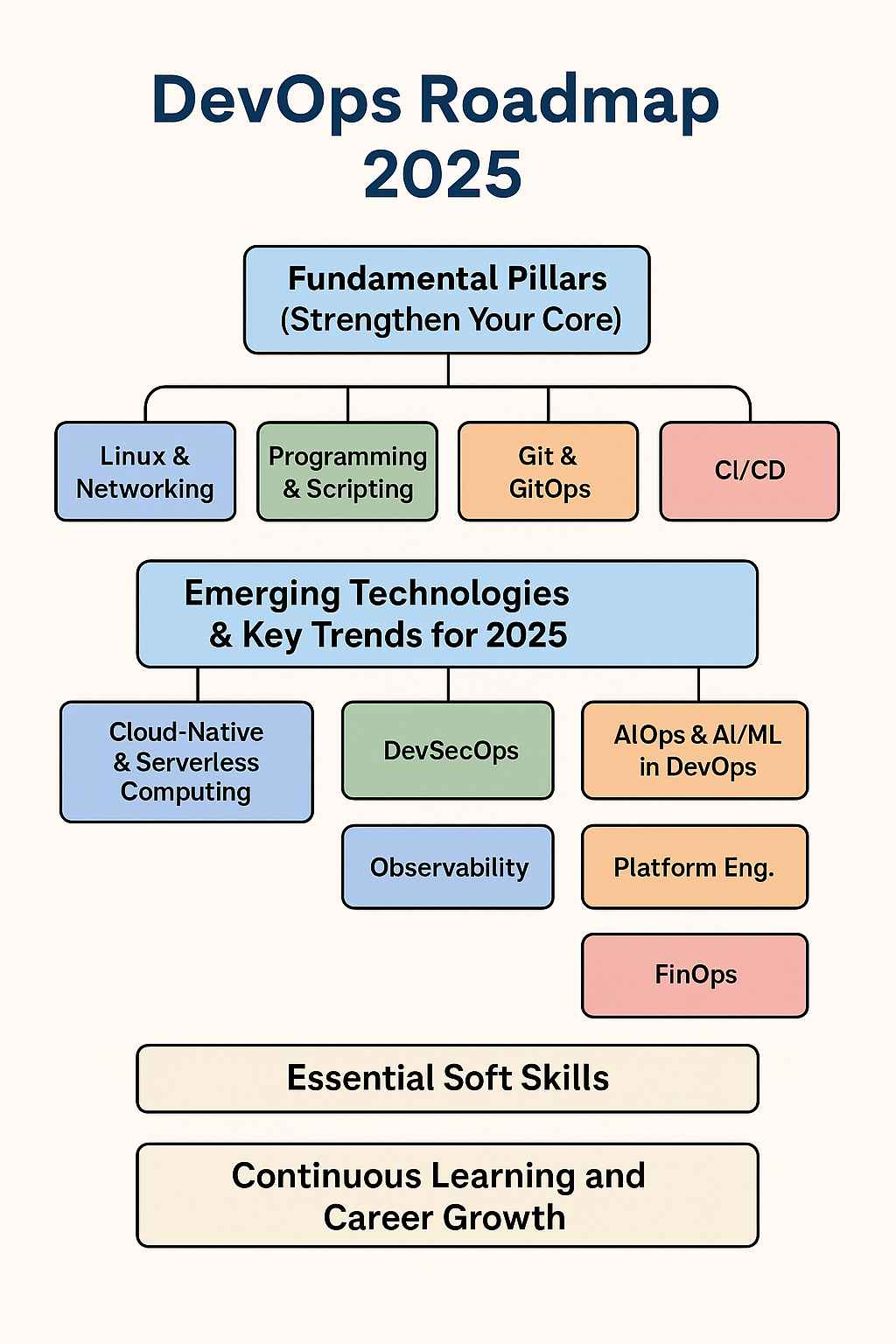
    DevOps isn’t just a buzzword anymore—it’s the foundation of how modern teams build, test, release, and manage software. In 2025, DevOps roadmap continues to evolve at lightning speed, with a stronger focus on automation, AI, security, and cloud-native tools.

    Whether you’re just starting or want to sharpen your edge, this roadmap breaks down everything you need to stay relevant and grow in the DevOps world this year. Here we can read DevOps Roadmap


    1. Master the DevOps Basics

    Before jumping into trendy tools, you need a strong core. Here’s where to start:

    Linux & Networking Skills

    • Learn Linux well: Practice shell commands, scripting, managing services, and customizing systems. Most cloud servers run Linux.
    • Understand networking: Get a grip on TCP/IP, DNS, VPNs, firewalls, and how everything connects behind the scenes.

    Programming & Scripting

    • Know at least one scripting language like Python, Go, or Bash.
    • These help you automate tasks and write scripts for deployments, monitoring, and more.

    Git & GitOps

    • Master Git: Learn how to branch, merge, rebase, and resolve conflicts confidently.
    • Learn GitOps: Use Git not just for code, but also for deploying infrastructure using tools like ArgoCD or Flux.

    CI/CD (Continuous Integration & Delivery)

    • Understand what CI/CD really means.
    • Try tools like Jenkins, GitHub Actions, GitLab CI/CD, and AWS CodePipeline.
    • Learn to add automated tests for code quality, security, and performance.

    2. Stay Ahead with 2025 DevOps Trends

    The DevOps world is shifting. These are the hot trends you should keep your eye on this year:

    Cloud-Native & Serverless

    • Be comfortable with at least one cloud: AWS, Azure, or GCP.
    • Learn Docker to containerize your apps.
    • Master Kubernetes (K8s) for managing large-scale container deployments.
    • Explore serverless platforms like AWS Lambda or Google Cloud Functions to run small apps without managing servers.

    DevSecOps (Security Built-In)

    • Shift security left: Add security checks early in your development process.
    • Automate security scans using tools like Snyk, Trivy, or Aqua.
    • Use tools like HashiCorp Vault for managing secrets safely.

    AI/ML in DevOps (AIOps & MLOps)

    • AI is entering DevOps. Learn how it helps detect problems, suggest fixes, or even write automation scripts.
    • If you’re into ML, understand MLOps to automate the full lifecycle: data → model → deployment → monitoring.

    Observability (More Than Just Monitoring)

    • Don’t just watch your systems—understand them.
    • Learn tools like Prometheus, Grafana, ELK Stack, and OpenTelemetry.
    • Set alerts and track logs, metrics, and traces to quickly catch and fix issues.

    Infrastructure as Code (IaC)

    • Write infrastructure like code using Terraform, Pulumi, or AWS CloudFormation.
    • Use Ansible, Puppet, or Chef to configure and manage your servers.

    Platform Engineering

    • Big teams are building internal platforms (IDPs) to give developers self-service tools and environments.
    • Focus on improving DevEx (developer experience) by automating routine tasks and reducing friction.

    FinOps (Cost Management for Cloud)

    • Cloud bills can get huge—learn to manage and reduce costs.
    • Use cost analysis tools, tag resources, and monitor budgets regularly.

    3. Don’t Ignore Soft Skills

    Great DevOps engineers are more than just tool experts. These soft skills matter just as much:

    • Communication: Explain complex tech in simple terms.
    • Collaboration: Work closely with developers, testers, and business teams.
    • Problem Solving: Think about systems as a whole.
    • Adaptability: Keep learning as tools and trends change.
    • User Focus: Remember—your job is to deliver value to users faster and safer.

    4. Grow Your Career (Keep Building, Keep Learning)

    Build Projects

    Hands-on work is the best teacher. Set up CI/CD pipelines, deploy on Kubernetes, or automate cloud infrastructure—even in your personal projects.

    Certifications

    Boost your credibility with these:

    • AWS Certified DevOps Engineer
    • Microsoft Certified: DevOps Engineer Expert
    • Certified Kubernetes Administrator (CKA)
    • Docker Certified Associate

    Join the Community

    Follow DevOps influencers on LinkedIn, attend meetups or conferences, and contribute to open-source projects. The community is a great place to learn and grow.

    Specialize Over Time

    As you gain experience, pick an area to go deep:

    • DevSecOps
    • Site Reliability Engineering (SRE)
    • Cloud Architecture
    • MLOps

    Final Thoughts

    2025 is the year DevOps becomes even smarter, more secure, and deeply automated. Whether you’re building your first CI/CD pipeline or managing Kubernetes at scale, there’s a place for you in this fast-growing field.

    Start small, stay consistent, and keep learning. The more you experiment and build, the more confident you’ll become.

    Next Steps

    DevOps_Roadmap_2025
    DevOps_Roadmap_2025
  • What is DevOps? Getting Started with AWS DevOps

    DevOps is a combination of cultural philosophies, automation practices, and collaboration tools that help teams release software faster and more reliably. This shift has created massive demand for DevOps engineer jobs across industries.

    Introduction: What is DevOps & Why DevOps Engineer Jobs Are in High Demand

    DevOps = Development + Operations working together using automation, cloud tools, and continuous delivery.


    How DevOps Works in Real Life

    Traditionally, developers write code, and operations teams deploy it. In DevOps, all teams — including development, operations, QA, and security — collaborate throughout the software lifecycle:

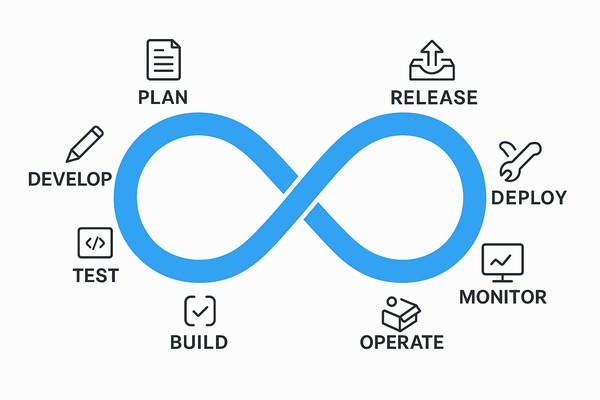
    Develop → Test → Deploy → Monitor → Improve

    This DevOps model enables faster delivery, fewer bugs, and smoother scaling.


    Why DevOps Engineer Jobs Are in High Demand

    With everything going digital — banking, shopping, entertainment — companies must release high-quality apps faster. DevOps helps them:

    • Deliver features quicker
    • Reduce production bugs
    • Improve customer satisfaction
    • Use cloud infrastructure efficiently

    Key Benefits of DevOps (Especially for DevOps Engineer Jobs)

    BenefitDescription
    SpeedFaster feature delivery than competitors
    Rapid DeliveryFrequent updates with automation
    ReliabilityFewer bugs, thanks to testing & monitoring
    ScalabilityEasily handle thousands of users or systems
    CollaborationImproved communication between teams
    SecurityAutomated security checks ensure compliance

    🔑 Core DevOps Practices You Must Know

    1️⃣ Continuous Integration (CI)

    Developers push code frequently, triggering automated tests.
    Tool Example: AWS CodeBuild

    2️⃣ Continuous Delivery (CD)

    Deploy changes to production without manual steps.
    Tool Example: AWS CodePipeline

    3️⃣ Microservices

    Break apps into independent components.
    Tool Example: AWS Lambda, ECS

    4️⃣ Infrastructure as Code (IaC)

    Use code to define your cloud infrastructure.
    Tool Example: AWS CloudFormation

    5️⃣ Configuration Management

    Keep systems consistent using automation.
    Tool Example: AWS Systems Manager

    6️⃣ Policy as Code

    Apply security rules via code to enforce compliance.
    Tool Example: AWS Config

    7️⃣ Monitoring & Logging

    Track system health and get alerts.
    Tools: Amazon CloudWatch, AWS CloudTrail

    8️⃣ Collaboration Tools

    Coordinate work across teams using Jira, Slack, or Confluence.


    Popular AWS DevOps Tools You’ll Use

    AWS ToolPurpose
    CodeCommitGit-based source control
    CodeBuildCode compilation & testing
    CodeDeployAutomated deployments
    CodePipelineCI/CD workflow automation
    CloudFormationInfrastructure as code
    CloudWatchMonitoring & alerts
    Systems ManagerConfiguration management

    Explore all AWS DevOps Services →


    How to Start Your DevOps Career on AWS

    1. Create a Free AWS Account
    2. Build a basic pipeline with CodeCommit + CodePipeline
    3. Use CloudFormation to write IaC in YAML or JSON
    4. Monitor your app with CloudWatch alarms and logs

    Final Thoughts for DevOps Engineer Job Seekers

    DevOps isn’t just tools — it’s a culture. It empowers engineers to:

    Work together
    Deliver faster
    Fail safely
    Continuously improve

    Whether you’re a fresher, backend developer, or sysadmin, DevOps engineer jobs can take your career to the next level.


    Next Steps

  • Top 7 Ways to Monetize Your DevOps Skills

    Are you a DevOps Engineer or learning DevOps and wondering how to turn your skills into a steady income? Great news — DevOps is one of the most in-demand and high-paying career paths today. But beyond just landing a full-time job, there are several creative and profitable ways to earn money using your DevOps knowledge.

    In this blog, we’ll explore multiple ways to make money as a DevOps Engineer, including active and passive income sources. Whether you’re a beginner or an experienced engineer, these ideas will help you monetize your skills and grow your income in 2025 and beyond.


    1. Full-Time Job as a DevOps Engineer

    This is the most common and stable income path for most DevOps professionals.

    • Job Titles: DevOps Engineer, SRE (Site Reliability Engineer), Cloud Engineer, Platform Engineer
    • Typical Stack: AWS, GCP, Azure, Docker, Kubernetes, Terraform, Jenkins, GitHub Actions, Ansible
    • Salary Range: $70,000 to $160,000+ per year (varies by country and experience)

    ✅ Pros: Stability, benefits, career growth
    ❌ Cons: Limited earning ceiling unless promoted


    2. Freelancing and Consulting

    Use your skills to help businesses on-demand.

    • Platforms: Upwork, Freelancer, Toptal, Fiverr
    • Services You Can Offer:
      • CI/CD pipeline setup
      • Docker & Kubernetes deployments
      • Infrastructure automation with Terraform or Ansible
      • Monitoring and alerting setup (Prometheus, Grafana)
    • Hourly Rate: $50 to $150 depending on expertise

    ✅ Pros: High earning potential, flexibility
    ✅ Pros: Work with global clients


    3. Sell DevOps Tools, Scripts, and Templates

    Turn your automation skills into digital products.

    • What to Sell:
      • Terraform modules
      • Docker Compose files
      • Prebuilt GitHub Actions workflows
      • Kubernetes deployment YAMLs
    • Platforms: Gumroad, Sellfy, Etsy (for tech downloads), or your personal blog

    ✅ Pros: Passive income potential
    ✅ Pros: Create once, sell repeatedly


    4. Start a DevOps YouTube Channel or Online Courses

    Video content is one of the best ways to educate and monetize DevOps topics.

    • Topics to Cover:
      • “How to deploy apps with Kubernetes”
      • “DevOps Roadmap for Beginners”
      • “AWS CI/CD pipeline setup”
    • Monetization Methods:
      • YouTube AdSense
      • Sponsorships from tools like DigitalOcean, Linode, JetBrains
      • Course sales (Udemy, Teachable, or self-hosted)

    ✅ Pros: Builds personal brand + recurring income
    ✅ Pros: Scalable audience


    5. Write Blogs, eBooks, and DevOps Newsletters

    If you’re not into video, writing is equally powerful.

    • Monetize Through:
      • Display ads (Google AdSense, Ezoic, Mediavine)
      • Affiliate links (AWS, hosting, courses)
      • Sell eBooks like “The DevOps Beginner’s Guide”
      • Create a paid newsletter on Substack

    ✅ Pros: Easy to start, long-term SEO value
    ✅ Pros: Grows trust and email list


    6. Build & Sell DevOps SaaS Tools

    Advanced, but extremely profitable.

    • Ideas:
      • Uptime monitoring service
      • Deployment dashboards
      • Cost-optimization tools for AWS or Kubernetes
    • Monetization: Monthly or yearly subscriptions

    ✅ Pros: Scalable recurring revenue
    ❌ Cons: Requires time, coding, and support


    7. Offer Mentorship, Coaching or Bootcamps

    Many people want to break into DevOps — you can help them.

    • Where to Offer Mentorship: Codementor, MentorCruise, ADPList
    • Other Options: Launch your own DevOps Bootcamp or private cohort-based course

    ✅ Pros: High pay per session, fulfilling work
    ✅ Pros: Build community and trust


    Summary Table: Ways to Make Money in DevOps

    MethodTypeEffortScalabilityIncome Potential
    Full-time JobActiveMediumLowHigh
    FreelancingActiveHighMediumHigh
    Sell Templates/ScriptsPassiveMediumHighMedium-High
    YouTube/CoursesSemi-passiveHighHighHigh
    Blogging/AffiliatesSemi-passiveMediumHighMedium-High
    SaaS ToolsPassiveVery HighVery HighVery High
    Mentorship/TeachingActiveMediumMediumMedium-High

    Final Thoughts

    DevOps Engineers have more income opportunities than ever. Whether you stick with a job, freelance, or start a content or product-based side hustle, the DevOps world gives you the tools to earn well — and build a name for yourself.

    Start with what you’re comfortable with. Maybe a blog or YouTube channel, then expand into freelancing or product creation.

    Ready to build a profitable DevOps side hustle? Start with a blog or YouTube channel today. Document everything you learn — it’s valuable!


    Want a step-by-step roadmap to make your first $1,000 as a DevOps Engineer? Let me know and I’ll share a weekly action plan!

    Next Steps

  • What is DevOps?

    In today’s fast-moving world of software, companies need to deliver updates quickly, reliably, and safely. it’s a powerful approach that combines development (Dev) and operations (Ops) to help teams work better together.

    In this blog, we’ll break down what DevOps is, why it matters, and how it’s changing the way software is built and delivered.


    What is DevOps?

    At its core, it is a culture, mindset, and set of practices that bring developers and operations teams together.

    Instead of working in silos — developers writing code, operations managing servers:
    Collaboration
    Communication
    Automation

    With this, teams can build, test, and release software faster and more reliably.


    Why is DevOps Important?

    Here’s why companies adopt DevOps:

    • Faster releases: Deliver new features and updates quickly.
    • Improved collaboration: Break down walls between teams.
    • Higher quality: Automated testing reduces human error.
    • More stability: Better monitoring and rollback tools help maintain uptime.
    • Happier teams: Developers and operations work as partners, not rivals.

    DevOps Tools (A Quick Look)

    There’s no single “DevOps tool,” but here are some popular categories:

    • Version Control: Git, GitHub, GitLab
    • CI/CD: Jenkins, GitHub Actions, GitLab CI
    • Containers: Docker, Kubernetes
    • Configuration Management: Ansible, Chef, Puppet
    • Cloud: AWS, Azure, Google Cloud
    • Monitoring: Prometheus, Grafana, ELK stack

    How Devops Works (Simple Example)

    Imagine you’re building a web app.

    1️⃣ You write code and push it to GitHub.
    2️⃣ A CI/CD pipeline automatically runs tests.
    3️⃣ If tests pass, the app is deployed to a server or cloud.
    4️⃣ Monitoring tools check if everything is working smoothly.
    5️⃣ If something breaks, you get alerts and can quickly fix it.

    All of this happens automatically


    💡 Key Principles

    • Automation: Automate everything from testing to deployment.
    • Continuous Integration (CI): Merge code frequently and test automatically.
    • Continuous Delivery (CD): Deploy updates to users quickly and safely.
    • Collaboration: Developers, testers, operations, and even security work together.
    • Monitoring: Watch systems in real time to catch problems early.

    Key Takeaways

    • DevOps is not just tools — it’s a culture and set of practices.
    • It helps teams work together, automate, and deliver faster.
    • Learning this gives you valuable skills for today’s tech jobs.

    AWS-DEVOPS

    Next Steps