Tag: devops engineer

  • DevOps vs SRE differences and when to use each

    DevOps and Site Reliability Engineering (SRE) have overlapping goals but differ significantly in focus, responsibilities, and approaches. we will see DevOps vs SRE differences in this article.

    Key Differences

    Focus:

    • DevOps focuses on the entire software development lifecycle, emphasizing collaboration between development and operations to deliver features quickly and reliably.
    • SRE focuses narrowly on system reliability, scalability, and stability in production, ensuring that changes do not increase failure rates or disrupt user experience.

    Responsibilities:

    • DevOps teams build and deploy new features, streamlining development and deployment pipelines with continuous integration and delivery practices.
    • SRE teams ensure production systems remain highly available and performant, using engineering practices to automate operations, monitor production, and handle incidents proactively.

    Objectives:

    • DevOps aims to accelerate product development and delivery to meet customer needs.
    • SRE aims to maintain service uptime and reliability, often setting and enforcing service-level objectives (SLOs) and error budgets.

    Team Structure:

    • DevOps teams integrate roles across software development and operations.
    • SRE teams consist of engineers skilled in both software and operations, focusing deeply on reliability engineering.

    Approach to Failures:

    • DevOps is more reactive, fixing problems as they appear and focusing on fast delivery.
    • SRE is proactive, analyzing root causes, performing chaos engineering, and preventing failures before they occur.

    When to Use Each

    • Use DevOps when you want to improve collaboration between development and operations, speed up software delivery, and implement continuous integration/delivery pipelines.
    • Use SRE when your priority is to maintain high reliability and availability of systems at scale, reduce downtime, and manage operational risk through data-driven reliability engineering practices.

    Main Differences: DevOps vs SRE

    FeatureDevOpsSRE
    Primary GoalSpeed & DeliveryReliability & Stability
    Main FocusEntire SDLC (plan → deploy)Production systems
    Mindset“Move fast”“Don’t break things”
    Approach to IssuesReactive + Continuous improvementProactive + Automated
    Key MetricsDeployment frequency, delivery timeUptime, error rate
    Who does it?Developers + Ops teamsSpecialized reliability engineers

    In essence, DevOps defines the broad culture and practices for faster development and deployment, while SRE applies engineering rigor to keep those deployed systems reliable in production. Organizations often integrate both for achieving fast, stable, and scalable software delivery

    Final Thoughts

    DevOps + SRE Better Together

    Here’s the secret:
    Most organizations don’t choose one over the other.

    DevOps = culture + speed
    SRE = discipline + reliability

    Together, they create a balanced system:

    • DevOps pushes updates quickly
    • SRE ensures updates don’t break the system

    Fast + Stable = Happy Users + Happy Business

    Next Steps :

  • AWS Well-Architected Framework: Building Reliable and Scalable Cloud Systems

    When we move our workloads to the cloud. it is not about spinning up servers or deploying apps.it is about building something that lasts forever. Something that’s secure, efficient and ready to scale as your business grows. That’s where the AWS Well-Architected Framework comes in.

    It helps cloud architects, developers and devops teams make better decisions while designing systems that are resilient, secure and optimized for performance and cost.


    What Is the AWS Well-Architected Framework?

    AWS Well-Architected Framework is a collection of key concepts, design principles and best practices for designing and running workloads in the cloud.


    The Six Pillars of AWS Well-Architected Framework

    The framework is built around six core pillars


    1. Operational Excellence

    Goal: Run and monitor systems effectively to deliver business value and continuously improve.
    This pillar focuses on automation, monitoring and incident response.
    You learn to document everything, evolve your procedures, and design systems that can be easily operated.

    Key takeaway: Build operations as code. Automate repetitive tasks and always keep improving.


    2. Security

    Goal: Protect data, systems and assets using cloud-native security practices.
    AWS encourages a defense-in-depth approach—secure every layer from identity and access to data encryption.

    Key takeaway: Security is everyone’s responsibility. Protect, detect and respond continuously.


    3. Reliability

    Goal: Ensure your workload performs correctly and consistently even when things go wrong.
    It’s all about resiliency, fault tolerance and disaster recovery. Design for failure because in the cloud, it’s inevitable, but manageable.

    Key takeaway: Don’t hope systems won’t fail design them to recover when they do.


    4. Performance Efficiency

    Goal: Use computing resources efficiently to meet system requirements and maintain performance as demand changes.
    This means choosing the right instance types, storage options and database solutions to optimize speed and scalability.

    Key takeaway: Continuously review and evolve your architecture as technology evolves.


    5. Cost Optimization

    Goal: Avoid unnecessary costs and maximize the business value from every dollar spent.
    AWS gives you visibility and tools like Cost Explorer and Budgets to monitor and control spending.

    Key takeaway: Pay only for what you use—and always look for smarter ways to save.


    6. Sustainability

    Goal: Minimize the environmental impact of your cloud workloads.
    This newer pillar focuses on using resources responsibly, choosing energy efficient regions and optimizing workloads to reduce carbon footprint.

    Key takeaway: Build green architectures that are efficient and sustainable for the planet.


    Why It Matters

    Applying the AWS Well-Architected Framework ensures your systems are resilient, cost-effective, and future-ready.
    Whether you’re a startup building your first cloud app or an enterprise migrating legacy workloads, this framework acts as your trusted compass in the cloud journey.

    By regularly reviewing your workloads against the six pillars, you’ll not only identify risks early but also make informed improvements that drive long-term success.


    Final Thoughts

    Cloud architecture isn’t just about deploying resources—it’s about building smart, secure, and sustainable systems.
    The AWS Well-Architected Framework provides the guidance to help you do exactly that balancing performance, cost, and reliability while keeping security and sustainability at the heart of it all.

    So the next time you design or review a workload, remember these six pillars — they’re not just best practices, they’re the foundation of every great cloud architecture

    What’s Next?

    The journey is ongoing. I’m glad to have you along for the ride.

    Devops tutorial :https://www.youtube.com/embed/6pdCcXEh-kw?si=c-aaCzvTeD2mH3Gv

  • Essential Ports and Protocols Every DevOps Engineer Should Know

    As a DevOps engineer, your work doesn’t stop at CI/CD pipelines or writing infrastructure-as-code. You’re also a bridge between development, operations, and the underlying network that makes everything talk to each other.should know Ports and Protocols.

    And here’s the truth: if you don’t understand the ports and protocols your systems rely on, troubleshooting production issues or securing them becomes a nightmare.

    So let’s break down the networking essentials every DevOps engineer should know — the ports and protocols, and why they matter in your daily workflow.

    1. Core Web and Application Protocols

    These are the backbone of Application — if your app touches the internet, you’re using these.

    ProtocolPortTransportWhy It Matters for DevOps
    HTTP (Hypertext Transfer Protocol)80TCPHandles unsecured web traffic. Typically used for redirects to HTTPS. Make sure your web servers (like Nginx or Apache) listen here only for redirection.
    HTTPS (HTTP Secure)443TCPEncrypts web communication using SSL/TLS. Ingress controllers, CDNs, and app servers must handle TLS certificates and termination correctly.
    DNS (Domain Name System)53UDP/TCPResolves domain names to IPs. Misconfigured DNS can break deployments, service discovery, or even CI/CD pipelines.

    Always validate your DNS records and automate certificate renewals (using something like cert-manager in Kubernetes).


    2. Infrastructure & Remote Access Protocols

    You’ll use these daily for server management, deployments, and automation.

    ProtocolPortTransportWhy It Matters
    SSH (Secure Shell)22TCPThe lifeline for secure remote access to Linux/Unix servers and CI/CD agents. Best practice: Change the default port and restrict access via firewalls or security groups.
    RDP (Remote Desktop Protocol)3389TCPUsed for graphical access to Windows servers. Even if you’re mostly cloud/Linux, it’s essential when managing Windows build agents or hybrid environments.

    Lock down SSH and RDP to specific IPs or use bastion hosts — never expose them directly to the internet.


    3. Database & Messaging Protocols

    If your app stores or moves data, these ports are the lifelines. They also happen to be common attack targets.

    ProtocolPortTransportWhy It Matters
    MySQL3306TCPStandard for MySQL/MariaDB. Should never be publicly accessible allow only internal traffic.
    PostgreSQL5432TCPPopular open-source database. Same rule: restrict access tightly.
    MongoDB27017TCPDefault MongoDB port. Enable authentication and firewall restrictions.
    Redis6379TCPUsed for caching and session storage. Protect it — Redis often holds sensitive in-memory data.
    MQTT1883 / 8883 (secure)TCPCommon in IoT and microservice messaging. Know these if managing brokers like Mosquitto.

    Treat database ports like secrets — only your app should be talking to them.


    4. Operational & Monitoring Ports

    These keep your systems observable, automatable, and healthy.

    Tool / ServicePortTransportWhy It Matters
    Jenkins8080TCPDefault for Jenkins and many CI/CD tools. Watch for port conflicts in shared environments.
    Prometheus9090TCPExposes metrics for scraping. Make sure Grafana or other dashboards can reach it.
    Grafana3000TCPDefault web UI for visualization dashboards.
    Kubernetes API Server6443TCPThe control plane’s main entry point. Lock it down with RBAC and network policies.
    Health ChecksVaries (e.g., 8080/8081)TCPUsed by Kubernetes or load balancers for readiness/liveness probes. Keep them lightweight and reliable.

    Ports Are Policy

    Understanding ports isn’t just about memorizing numbers — it’s about enforcing good security and operational practices.

    Here’s how to apply this knowledge:

    • Principle of Least Privilege: Only open what’s absolutely necessary. Close everything else.
    • Use FQDNs over IPs: DNS simplifies environment management and scaling — let names handle the routing.
    • Audit Regularly: Tools like ss, netstat, or Kubernetes kubectl port-forward can show you exactly what’s exposed.
    • Embrace HTTPS: Port 80 should exist only to redirect traffic to 443. Automate SSL/TLS renewal and rotation.

    Final Thoughts

    Networking isn’t just the concern of your infrastructure team .it’s part of your DevOps DNA. By mastering ports and protocols, you’re not just connecting services; you’re building reliable, secure, and scalable systems that stand strong under real-world traffic.

    After all, every deployment travels across the network — make sure you understand the roads it takes

    What’s Next?

    The journey is ongoing. I’m glad to have you along for the ride.

    Devops tutorial :https://www.youtube.com/embed/6pdCcXEh-kw?si=c-aaCzvTeD2mH3Gv
  • How I Used AWS re/Start Program in India to Start My DevOps Career

    Hello, Friends. Many people think starting a career in AWS,cloud or DevOps requires Thousand of rupees for training or bootcamps. I’m here to tell you from my own experience — you don’t need to spend a single rupee to begin.

    I’m from a non-IT background Leather Technology graduate and today I’m a DevOps Engineer. My journey began with the AWS re/Start program — a free cloud training program supported by Amazon Web Services and delivered by partner organizations across India.

    If you are unemployed, switching careers, or simply don’t have the money for expensive coaching, this is one of the best opportunities available.


    What is AWS re/Start?

    Free, full-time cloud training with no hidden fees is available for aspiring professionals. The program covers essential topics such as Linux, networking, AWS services, Python, security, and DevOps basics. In addition to technical skills, it also includes soft skills training like communication, teamwork, resume building, and mock interviews.

    Upon successful completion, participants gain access to interview opportunities with hiring partners, helping them launch their careers in the cloud domai


    AWS re/Start Training Partners in India

    You can apply to these organizations (all free):

    • Dhyanahitha Educational Society
    • Don Bosco Tech Society
    • EduBridge
    • Generation India Foundation
    • HOPE Foundation
    • JobsAcademy (2COMS Group)
    • Magic Bus India Foundation
    • Tata STRIVE (Tata Community Initiatives Trust)
    • Tech Mahindra Foundation
    • Vinsys
    • Apply here: AWS re/Start Application Page

    My Personal Journey

    1. Applied Everywhere → I didn’t wait for one response, I applied to all partners.
    2. Got Selected → Basic aptitude + communication test, then interview.
    3. Started Learning → Daily classes on Linux, networking, AWS basics, and Python.
    4. Faced Failures → After completing the course, I failed 3 job interviews.
    5. Kept Going → On my 4th attempt, I finally cracked the interview.
    6. First Job → Got my first DevOps role in a startup. That became my foundation and later I joined Zoho Corporation.

    Tips for Learners

    Don’t waste your money on paid training — the AWS re/Start program is completely free. Apply to all partners to maximize your chances of getting selected, and once you’re in, stay disciplined and treat the course like a full-time job. Remember, failing interviews is normal; I personally failed three times before finally succeeding. What matters is focusing on core skills like Linux commands, networking basics, AWS services such as EC2, S3, IAM, and VPC, along with developing a strong problem-solving mindset. Stay connected with peers, learn together, and keep yourself motivated — consistency and perseverance will eventually lead you to success.


    Final Thoughts

    The AWS re/Start program changed my life without costing me a rupee. If you are unemployed, from a non-IT background, or cannot afford expensive training, this program is for you.

    I started from scratch, failed multiple times, but never gave up. Today, I’m working as a DevOps Engineer because of this opportunity.

    If I can do it, so can you.

    Action Step: Visit the AWS re/Start Application Page, apply to all partners, and start your journey today.

    What’s Next?

    The journey is ongoing. I’m glad to have you along for the ride.

    Devops tutorial :https://www.youtube.com/embed/6pdCcXEh-kw?si=c-aaCzvTeD2mH3Gv

  • My DevOps Journey: From Leather Tech to Cloud Engineering

    Hello all Devops & Developers!

    My name is Srikanth,and this is the first post in my public learning journey. I’m currently a DevOps Engineer at Zoho Corporation but my path to get here was anything but straight. This blog is my attempt to document my continuous learning in the world of DevOps and share the lessons I pick up along the way.

    My story begins in a small village where the idea of a career in cutting-edge technology felt a world away. I worked hard, secured a place at Anna University in Chennai and pursued a degree in… Leather Technology. It was a fascinating field and I was proud to be placed in a core company right after graduation.

    But just four months in, I had a nagging feeling that I was on the wrong path. The work wasn’t igniting my passion. I made a tough decision: I quit my job to chase a curiosity that had been growing for a while – the world of cloud computing.

    This was my pivot point. I enrolled in the AWS re/Start program, a full-time, online-based course that takes you from zero to cloud-ready. I immersed myself, studied relentlessly and earned my first AWS certification. That certification was more than a piece of paper; it was my entry ticket. In August 2023, I landed my first tech role as a DevOps Engineer at a startup.

    For nine incredible months, I learned more than I ever thought possible. The startup environment was a trial by fire, and it solidified my love for building, automating, and solving complex problems. That experience paved the way for my current role at Zoho Corporation.

    Why I’m Sharing This Journey

    Even though I’m now working in the field, I firmly believe that in DevOps, you are never done learning. The landscape of tools and best practices is constantly evolving. My goal for this blog is to create a space for continuous growth. This won’t be a polished tutorial series from an expert. This is a real-time log from a practicing engineer who is always learning.

    Let’s Learn and Grow Together

    I’m putting my learning goals out there to hold myself accountable, but I also want to build something more: a community.

    My vision is for this blog to be an interactive space. Join me in the comments with your own studies and queries. Let’s share learning skills, help each other with debugging complex issues, and grow as a community. We can all become better engineers when we grow as a group. This is our space to learn and grow, together.

    What’s Next?

    The journey is ongoing. I’m glad to have you along for the ride.

    Devops tutorial :https://www.youtube.com/embed/6pdCcXEh-kw?si=c-aaCzvTeD2mH3Gv
  • Practical Strategies for Implementing DevOps Successfully

    DevOps — it’s more than a buzzword. It promises faster delivery, improved collaboration, better-quality software, and reduced time to market. But for many teams, DevOps remains a lofty goal rather than a practical reality.

    If you’ve ever felt overwhelmed by the countless tools, frameworks, and shifting responsibilities, you’re not alone. The challenge isn’t about lacking resources; it’s about navigating complexity and driving real, sustainable change.

    Instead, start small with a well-defined pilot project that acts as a proving ground.

    How to Do It:

    • Pick a low-risk application — something non-critical where failure won’t be catastrophic.
    • Assemble a cross-functional team — include devs, ops, QA, and product owners to break silos early.
    • Target a specific pain point — slow deployment? Poor feedback loops? Focus on solving one problem with DevOps principles.

    Tip: A successful pilot builds internal case studies, showing real benefits and creating champions for broader adoption.

    Automate, Automate, Automate — But Do It Smartly

    At its core, DevOps is about automation—but not blind automation. The goal is to free your teams from repetitive, error-prone tasks so they can focus on innovation and delivery.

    Key Areas to Automate:

    • Version Control Everything
      Not just code—put infrastructure, config files, and test scripts in Git. IaC (Infrastructure as Code) is non-negotiable.
    • Build CI/CD Pipelines
      Implement Continuous Integration and Continuous Delivery using tools like Jenkins, GitLab CI/CD, GitHub Actions, or Azure DevOps.
    • Automate Testing
      Include unit, integration, and performance tests in your pipeline to catch bugs early.
    • Automate Infrastructure Provisioning
      Use tools like Terraform, Ansible, or Pulumi to provision environments consistently and reproducibly.

    Start small: Automate the most time-consuming or failure-prone manual processes first.

    Foster a Culture of Collaboration and Shared Responsibility

    DevOps isn’t just about tools—it’s a cultural transformation. The hardest part of DevOps is often human, not technical.

    Culture Hacks for DevOps Success:

    • Blameless Postmortems
      Focus on learning, not blaming. Encourage transparency after incidents.
    • Shared Goals & Metrics
      Developers and Ops should align around KPIs like uptime, lead time, and incident recovery rate.
    • Cross-Training
      Let developers understand infra, and ops understand code. Hold regular internal workshops and pair programming sessions.
    • Feedback Loops
      Build systems where teams get real-time feedback on how code performs in production.

    DevOps thrives when teams own the entire lifecycle—from development to deployment to operations.

    Prioritize Observability: Monitoring and Logging from Day One

    You can’t fix what you can’t see. Without visibility, DevOps collapses into guesswork. Robust monitoring and logging are essential for healthy operations.

    Observability Essentials:

    • Centralized Logging
      Use tools like the ELK Stack, Splunk, or Datadog to aggregate logs for fast troubleshooting.
    • Monitoring Key Metrics
      Watch CPU, memory, disk I/O, application latency, and user behavior.
    • Set Up Alerts
      Configure smart alerts to detect anomalies before users do.
    • Distributed Tracing
      Especially in microservices, tracing tools like Jaeger, Zipkin, or OpenTelemetry help track issues across services.

    From Day 1, embed observability into your workflows to shift from reactive firefighting to proactive problem-solving.

    DevOps Is a Journey, Not a Destination

    DevOps isn’t a one-and-done transformation. It’s a continuous improvement mindset. It requires:

    • Technical excellence
    • Collaborative culture
    • Data-driven decision-making
    • A willingness to adapt

    By starting small, automating smartly, fostering collaboration, and prioritizing observability, your organization can move beyond the hype and start realizing DevOps’ full potential—delivering high-quality software quickly, safely, and at scale.

    What’s Your DevOps Challenge?

    Are you struggling with automation, culture, tooling, or something else?

    Leave a comment below — let’s make DevOps simpler, together.

    Next Steps

  • Top 7 Ways to Monetize Your DevOps Skills

    Are you a DevOps Engineer or learning DevOps and wondering how to turn your skills into a steady income? Great news — DevOps is one of the most in-demand and high-paying career paths today. But beyond just landing a full-time job, there are several creative and profitable ways to earn money using your DevOps knowledge.

    In this blog, we’ll explore multiple ways to make money as a DevOps Engineer, including active and passive income sources. Whether you’re a beginner or an experienced engineer, these ideas will help you monetize your skills and grow your income in 2025 and beyond.


    1. Full-Time Job as a DevOps Engineer

    This is the most common and stable income path for most DevOps professionals.

    • Job Titles: DevOps Engineer, SRE (Site Reliability Engineer), Cloud Engineer, Platform Engineer
    • Typical Stack: AWS, GCP, Azure, Docker, Kubernetes, Terraform, Jenkins, GitHub Actions, Ansible
    • Salary Range: $70,000 to $160,000+ per year (varies by country and experience)

    ✅ Pros: Stability, benefits, career growth
    ❌ Cons: Limited earning ceiling unless promoted


    2. Freelancing and Consulting

    Use your skills to help businesses on-demand.

    • Platforms: Upwork, Freelancer, Toptal, Fiverr
    • Services You Can Offer:
      • CI/CD pipeline setup
      • Docker & Kubernetes deployments
      • Infrastructure automation with Terraform or Ansible
      • Monitoring and alerting setup (Prometheus, Grafana)
    • Hourly Rate: $50 to $150 depending on expertise

    ✅ Pros: High earning potential, flexibility
    ✅ Pros: Work with global clients


    3. Sell DevOps Tools, Scripts, and Templates

    Turn your automation skills into digital products.

    • What to Sell:
      • Terraform modules
      • Docker Compose files
      • Prebuilt GitHub Actions workflows
      • Kubernetes deployment YAMLs
    • Platforms: Gumroad, Sellfy, Etsy (for tech downloads), or your personal blog

    ✅ Pros: Passive income potential
    ✅ Pros: Create once, sell repeatedly


    4. Start a DevOps YouTube Channel or Online Courses

    Video content is one of the best ways to educate and monetize DevOps topics.

    • Topics to Cover:
      • “How to deploy apps with Kubernetes”
      • “DevOps Roadmap for Beginners”
      • “AWS CI/CD pipeline setup”
    • Monetization Methods:
      • YouTube AdSense
      • Sponsorships from tools like DigitalOcean, Linode, JetBrains
      • Course sales (Udemy, Teachable, or self-hosted)

    ✅ Pros: Builds personal brand + recurring income
    ✅ Pros: Scalable audience


    5. Write Blogs, eBooks, and DevOps Newsletters

    If you’re not into video, writing is equally powerful.

    • Monetize Through:
      • Display ads (Google AdSense, Ezoic, Mediavine)
      • Affiliate links (AWS, hosting, courses)
      • Sell eBooks like “The DevOps Beginner’s Guide”
      • Create a paid newsletter on Substack

    ✅ Pros: Easy to start, long-term SEO value
    ✅ Pros: Grows trust and email list


    6. Build & Sell DevOps SaaS Tools

    Advanced, but extremely profitable.

    • Ideas:
      • Uptime monitoring service
      • Deployment dashboards
      • Cost-optimization tools for AWS or Kubernetes
    • Monetization: Monthly or yearly subscriptions

    ✅ Pros: Scalable recurring revenue
    ❌ Cons: Requires time, coding, and support


    7. Offer Mentorship, Coaching or Bootcamps

    Many people want to break into DevOps — you can help them.

    • Where to Offer Mentorship: Codementor, MentorCruise, ADPList
    • Other Options: Launch your own DevOps Bootcamp or private cohort-based course

    ✅ Pros: High pay per session, fulfilling work
    ✅ Pros: Build community and trust


    Summary Table: Ways to Make Money in DevOps

    MethodTypeEffortScalabilityIncome Potential
    Full-time JobActiveMediumLowHigh
    FreelancingActiveHighMediumHigh
    Sell Templates/ScriptsPassiveMediumHighMedium-High
    YouTube/CoursesSemi-passiveHighHighHigh
    Blogging/AffiliatesSemi-passiveMediumHighMedium-High
    SaaS ToolsPassiveVery HighVery HighVery High
    Mentorship/TeachingActiveMediumMediumMedium-High

    Final Thoughts

    DevOps Engineers have more income opportunities than ever. Whether you stick with a job, freelance, or start a content or product-based side hustle, the DevOps world gives you the tools to earn well — and build a name for yourself.

    Start with what you’re comfortable with. Maybe a blog or YouTube channel, then expand into freelancing or product creation.

    Ready to build a profitable DevOps side hustle? Start with a blog or YouTube channel today. Document everything you learn — it’s valuable!


    Want a step-by-step roadmap to make your first $1,000 as a DevOps Engineer? Let me know and I’ll share a weekly action plan!

    Next Steps

  • What Does a DevOps Engineer Do?

    In today’s fast-moving tech world, businesses need to deliver software faster, safer, and more reliably than ever before. That’s where a DevOps Engineer comes in. But what exactly do DevOps engineers do, and why are they in such high demand?

    This blog will break down the roles, tools, and responsibilities of a DevOps engineer in simple language, while also giving you expert insights into why this is a top career choice.


    Who Is a DevOps Engineer?

    A DevOps engineer is a professional who combines software development (Dev) and IT operations (Ops) skills to automate, streamline, and improve the software delivery process.

    They bridge the gap between developers and system administrators to ensure:

    • Faster deployments
    • Higher reliability
    • Continuous delivery of software

    Key Responsibilities of a DevOps Engineer

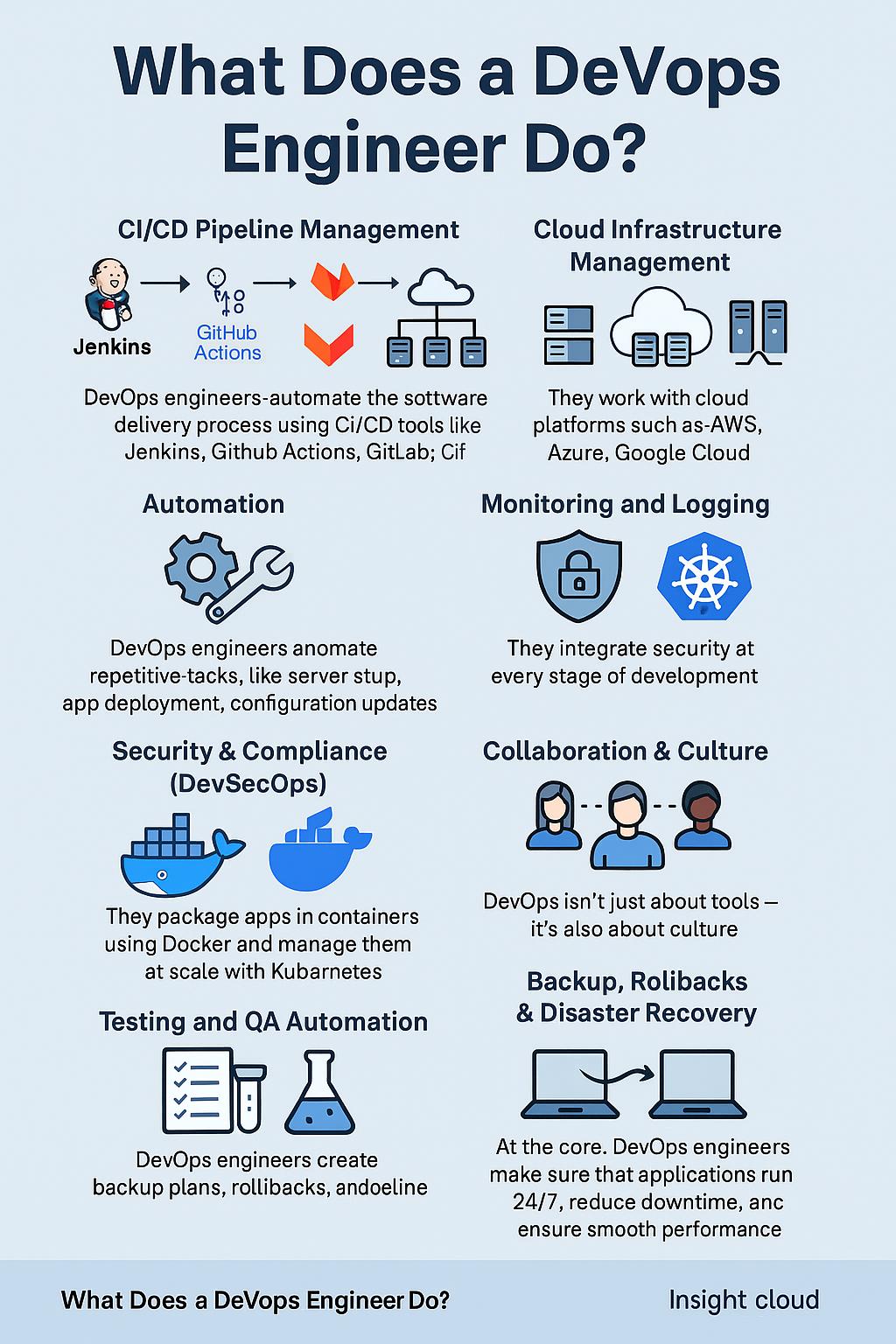
    1. CI/CD Pipeline Management

    DevOps engineers build and manage CI/CD pipelines (Continuous Integration and Continuous Deployment). These pipelines automatically test, build, and deploy code with tools such as:

    • Jenkins
    • GitHub Actions
    • GitLab CI/CD
    • CircleCI

    Why it matters: Code gets from developers to production faster, with fewer bugs.


    2. Cloud Infrastructure Management

    Most DevOps engineers manage cloud platforms like:

    • Amazon Web Services (AWS)
    • Microsoft Azure
    • Google Cloud Platform (GCP)

    They handle tasks like:

    • Setting up servers
    • Configuring databases
    • Managing networking
    • Scaling infrastructure automatically using Infrastructure as Code (IaC) tools like Terraform or CloudFormation

    3. Automation of Repetitive Tasks

    A big part of DevOps is automation. DevOps engineers automate things like:

    • App deployments
    • Server setup
    • Configuration updates

    Tools used:

    • Ansible
    • Puppet
    • Chef
    • Bash/Python scripting

    4. Monitoring and Logging

    Keeping an eye on systems is vital. DevOps engineers use monitoring and logging tools to:

    • Detect errors early
    • Ensure performance
    • Trigger alerts if systems go down

    Popular tools:

    • Prometheus
    • Grafana
    • ELK Stack (Elasticsearch, Logstash, Kibana)
    • Datadog

    5. Security Integration (DevSecOps)

    Modern DevOps includes security from the beginning — this is called DevSecOps.

    Security practices include:

    • Vulnerability scanning
    • Secrets management
    • Setting role-based access controls

    Popular tools:

    • Snyk
    • Trivy
    • HashiCorp Vault

    6. Containerization & Orchestration

    DevOps engineers use containers to bundle applications with everything they need to run anywhere.

    Key tools:

    • Docker (for containers)
    • Kubernetes (for managing and scaling containers)
    • Helm (for managing Kubernetes apps)

    7. Collaboration Between Teams

    DevOps is not just a job — it’s a culture. DevOps engineers:

    • Promote communication between dev and ops
    • Encourage transparency
    • Reduce silos

    This leads to quicker releases and higher-quality software.


    8. Testing and Quality Assurance

    DevOps engineers set up automated tests to catch bugs early in the software lifecycle.

    Test types:

    • Unit tests
    • Integration tests
    • Load tests

    Tools used:

    • Selenium
    • JUnit
    • Postman

    9. Backup and Disaster Recovery

    To prevent data loss, DevOps engineers create:

    • Backup systems
    • Rollback strategies
    • Disaster recovery plans

    10. Keep Everything Running Smoothly

    Ultimately, a DevOps engineer ensures that:

    • Applications run 24/7
    • Issues are fixed quickly
    • Releases happen safely

    They’re like the behind-the-scenes superheroes of tech.


    Why Companies Need DevOps Engineers

    • Faster time to market
    • Fewer bugs in production
    • Lower development costs
    • Better product stability and scalability
    • Happier customers and teams

    📈 Top Skills of a Successful DevOps Engineer

    SkillTools & Technologies
    Version ControlGit, GitHub, GitLab
    CI/CDJenkins, GitHub Actions
    CloudAWS, Azure, GCP
    ContainersDocker, Kubernetes
    AutomationAnsible, Terraform
    MonitoringPrometheus, Grafana
    ScriptingBash, Python

    Final Thoughts

    A DevOps engineer is essential in the modern software development lifecycle. They don’t just write code or manage servers — they enable businesses to scale, innovate, and deliver faster.

    If you’re considering a career in tech, becoming a DevOps engineer is a smart, high-impact choice.


    Keywords for This Blog:

    • What does a DevOps engineer do
    • DevOps responsibilities
    • DevOps tools and technologies
    • DevOps job description
    • Cloud and DevOps career
    • CI/CD pipelines explained
    • DevOps engineer in demand

    Next Steps

  • What Does a DevOps Engineer Do?

    Introduction

    You may have heard of a software developer or a system administrator. But what about a DevOps Engineer? Who are they? What do they actually do?

    In this blog, you’ll get a clear understanding of the role of a DevOps Engineer, why they’re important, and what tools and skills they use every day.

    Let’s break it down in a simple, professional, and easy-to-understand way.

    Who is a DevOps Engineer?

    A DevOps Engineer is someone who works at the center of software development and IT operations.

    Their main goal?

    Make sure code written by developers gets tested, deployed, and monitored smoothly without errors.

    They:

    • Help developers release updates faster
    • Automate everything from testing to deployment
    • Monitor systems to keep everything running

    What Does a DevOps Engineer Actually Do?

    Here are the core responsibilities:

    1. Collaboration

    They work with developers, testers, and IT teams to make sure everyone is on the same page.

    2. Automation

    They build systems that automate repetitive tasks like:

    • Code building
    • Testing
    • Deployment
    • Monitoring

    3. CI/CD Management

    They manage Continuous Integration and Continuous Delivery (CI/CD) pipelines. These are like smart machines that:

    • Take code from developers
    • Automatically test it
    • Deliver it to users without human effort

    4. Infrastructure as Code (IaC)

    DevOps Engineers treat servers like code. They use tools to:

    • Set up infrastructure with scripts (like writing instructions for computers)
    • Recreate environments quickly and safely

    5. Monitoring and Logging

    They set up systems that:

    • Watch how apps are running
    • Log any issues or crashes
    • Alert the team immediately

    6. Security and Backup

    They also add security checks and make sure backups are in place in case something goes wrong.


    Tools Used by DevOps Engineers

    AreaTools
    Code VersioningGit, GitHub
    CI/CDJenkins, GitHub Actions
    ContainersDocker
    OrchestrationKubernetes
    IaCTerraform, AWS CloudFormation
    MonitoringGrafana, Prometheus
    ConfigurationAnsible, Chef
    CloudAWS, Azure, GCP

    These tools help DevOps Engineers build, test, deploy, and monitor systems faster and better.

    Why Are DevOps Engineers So Important?

    Without them:

    • Deployments take longer
    • Bugs are harder to track
    • Developers and IT teams struggle to work together

    With them:

    • Everything is faster, safer, and smoother
    • Users get new features quickly
    • Systems are reliable, even during updates

    What Skills Do DevOps Engineers Need?

    • Basic coding (usually in Python, Shell, or Bash)
    • Strong understanding of Linux/Unix systems
    • Knowledge of cloud platforms (AWS, Azure, GCP)
    • Familiarity with CI/CD pipelines
    • Good communication and problem-solving skills

    Next Steps