Author: DevOps Tech Guy

  • Top 15 Site Reliability Engineer (SRE) Tools – Modern 2026 Guide

    Site Reliability Engineering (SRE) has evolved from a niche Google practice into a core engineering discipline adopted by startups and enterprises alike. Today, SRE is not just about keeping systems alive—it is about engineering reliability as a feature, balancing speed with stability, and using automation to scale operations intelligently.

    In this modern guide, you will learn the top 15 SRE tools used in real-world production environments, how they fit into the SRE workflow, and how to choose the right stack for your organization or career growth.


    What Is Site Reliability Engineering (SRE)?

    Site Reliability Engineering applies software engineering principles to infrastructure and operations problems. Instead of relying on manual operations, SRE teams build automated systems to ensure:

    • High availability
    • Low latency
    • Predictable releases
    • Fast incident recovery
    • Strong observability

    At the core of SRE lie concepts such as SLIs (Service Level Indicators), SLOs (Service Level Objectives), and error budgets. Tools are the backbone that make these concepts measurable and actionable.


    Core Categories of SRE Tools

    Modern SRE tooling generally falls into five categories:

    1. Monitoring and Observability
    2. Log Management and Analytics
    3. Incident Management
    4. Configuration Management and Automation
    5. CI/CD and Reliability Enablement

    Let’s explore the most widely used tools in each category.


    Monitoring and Observability Tools

    1. Prometheus

    Prometheus is the de facto standard for metrics monitoring in cloud-native environments. It uses a pull-based model to scrape metrics over HTTP and stores them as time-series data.

    Why SREs use Prometheus:

    • Powerful query language (PromQL)
    • Native Kubernetes integration
    • Fine-grained metrics labeling
    • Strong alerting with Alertmanager

    Prometheus excels at measuring SLIs, making it a foundational SRE tool.


    2. Grafana

    Grafana transforms raw metrics into clear, actionable dashboards. It integrates seamlessly with Prometheus, Elasticsearch, Loki, cloud providers, and many other data sources.

    Key strengths:

    • Real-time dashboards
    • Custom alerts
    • Team collaboration
    • Single-pane-of-glass visibility

    Grafana is often the visual layer of an SRE observability stack.


    3. New Relic

    New Relic provides full-stack observability across applications, infrastructure, logs, and user experience.

    Best for:

    • Application Performance Monitoring (APM)
    • Distributed tracing
    • Real user monitoring
    • Change impact analysis

    Its low learning curve makes it popular among teams transitioning into SRE.


    4. Datadog

    Datadog is an all-in-one observability platform used heavily in SaaS and cloud-first companies.

    Why Datadog stands out:

    • Automatic anomaly detection
    • Infrastructure, APM, logs, and security in one platform
    • Watchdog-driven intelligent alerts
    • Excellent cloud integrations

    Datadog helps SREs detect issues before users feel them.


    5. Nagios

    Nagios is one of the oldest monitoring tools still widely used today, especially in enterprise and legacy environments.

    Strengths:

    • Plugin-based architecture
    • Host and service monitoring
    • Strong community ecosystem

    While modern stacks may move beyond Nagios, it remains relevant for traditional infrastructures.


    6. AppDynamics

    AppDynamics focuses on business-centric application monitoring, correlating performance metrics with real business outcomes.

    Key features:

    • End-to-end transaction tracing
    • Anomaly detection
    • Root cause analysis
    • SAP and enterprise system monitoring

    It is commonly used in large enterprises with complex application landscapes.


    Log Management and Analytics Tools

    7. Kibana

    Kibana is the visualization layer of the Elastic ecosystem, enabling powerful log exploration and analysis.

    Why SREs rely on Kibana:

    • Fast log searching
    • Threat investigation
    • Unified observability UI
    • Native Elasticsearch integration

    Logs become a debugging superpower when paired with Kibana.


    8. Splunk

    It is an AI-driven observability and security platform widely adopted in mission-critical environments.

    Splunk excels at:

    • Real-time log analytics
    • Predictive alerts
    • Security and compliance
    • High-volume data ingestion

    It is often used where downtime has serious financial or regulatory impact.


    9. ELK Stack (Elasticsearch, Logstash, Kibana)

    The ELK Stack provides a flexible, open-source solution for collecting, processing, and visualizing logs.

    Why ELK is popular:

    • Works with any data source
    • Highly customizable dashboards
    • Scalable architecture

    ELK is ideal for teams that want full control over their observability pipeline.


    Incident Management Tools

    10. PagerDuty

    PagerDuty is a cornerstone of modern incident response.

    Core capabilities:

    • On-call scheduling
    • Intelligent alert routing
    • Incident automation
    • Post-incident analytics

    PagerDuty ensures the right engineer is notified at the right time.


    11. Asana

    Although primarily a project management tool, Asana is often used by SRE teams for:

    • Incident follow-ups
    • Reliability initiatives
    • Postmortem action tracking

    Its automation and AI features improve cross-team coordination.


    12. Splunk On-Call (VictorOps)

    Splunk On-Call specializes in fast, targeted incident resolution.

    Highlights:

    • Context-rich alerts
    • Escalation policies
    • Mobile-first incident handling

    It reduces alert fatigue and speeds up Mean Time to Resolution (MTTR).


    Configuration Management and Automation Tools

    13. Ansible

    Ansible simplifies automation using human-readable YAML playbooks.

    Used for:

    • Configuration management
    • Application deployment
    • Infrastructure orchestration

    Its agentless architecture makes it easy to adopt and scale.


    14. Terraform

    Terraform is the industry standard for Infrastructure as Code (IaC).

    Why SREs depend on Terraform:

    • Declarative infrastructure
    • Multi-cloud support
    • Version-controlled environments
    • Policy and access enforcement

    Terraform enables reliable, repeatable infrastructure provisioning.


    15. Jenkins

    Jenkins remains a widely used CI/CD automation tool.

    Strengths:

    • Extensive plugin ecosystem
    • Pipeline automation
    • Integration with almost any tool

    In SRE workflows, Jenkins supports safe deployments and reliability testing.


    Key Features to Look for in SRE Tools

    When selecting SRE tools, prioritize:

    • Automation and self-healing
    • Seamless integrations
    • Scalability and performance
    • Strong alerting and analytics
    • Reasonable learning curve and pricing

    The best tools align with your system complexity and team maturity.


    SRE Tools vs Traditional DevOps Tools

    SRE ToolsDevOps Tools
    Focus on reliabilityFocus on delivery speed
    Metrics, SLOs, error budgetsCI/CD and collaboration
    Failure reductionWorkflow optimization

    SRE complements DevOps by adding engineering rigor to reliability.


    Certifications for Aspiring SREs

    • SRE Foundation Certification
    • SRE Practitioner (DevOps Institute)
    • Microsoft Azure DevOps Engineer Expert (AZ-400)
    • Certified Reliability Professional (CRP)
    • Docker Certified Associate (DCA)

    Certifications validate both theoretical knowledge and practical skills.


    Final Thoughts

    Modern Site Reliability Engineering is impossible without the right tools. However, tools alone do not create reliability—engineering mindset, automation, and continuous learning do.

    If you are transitioning into SRE or scaling production systems, mastering these tools will place you on a strong career trajectory in 2026 and beyond.


    Want more in-depth SRE, DevOps, and cloud-native guides? Follow InsightClouds for practical, production-ready engineering content.

    Next Steps :
    Devops tutorial :https://www.youtube.com/embed/6pdCcXEh-kw?si=c-aaCzvTeD2mH3Gv

    Follow our DevOps tutorials

    Explore more DevOps engineer career guides

    Subscribe to InsightClouds for weekly updates

  • DNS Records, Propagation, Nameservers, Security, and Best Practices

    In Part 1, we learned:

    • What DNS is
    • Why DNS exists
    • How DNS connects humans and computers

    In Part 2, we explored:

    • DNS hierarchy
    • Root, TLD, and authoritative servers
    • Step-by-step DNS resolution
    • DNS caching and TTL

    Now, in Part 3, we move into practical and real-world DNS knowledge.

    This part will help you:

    • Understand DNS records clearly
    • Avoid common DNS mistakes
    • Manage domains confidently
    • Build awareness about DNS security

    By the end, you will have a complete DNS foundation.


    What Are DNS Records?

    DNS records are instructions stored inside authoritative DNS servers.

    They tell the internet:

    • Where your website lives
    • Where emails should be delivered
    • How domain verification works
    • Which servers control your domain

    Each record has:

    • A type
    • A value
    • A TTL (Time To Live)

    Most Important DNS Record Types

    1. A Record (Address Record)

    Maps a domain name to an IPv4 address.

    Example:

    example.com → 93.184.216.34
    

    Use case:

    • Website hosting
    • API endpoints
    • Server access

    This is the most basic and essential DNS record.


    2. AAAA Record (IPv6 Address)

    Maps a domain name to an IPv6 address.

    Example:

    example.com → 2001:db8::1
    

    Used when:

    • IPv6 networking is enabled
    • Modern cloud infrastructure is used

    3. CNAME Record (Canonical Name)

    Creates an alias for another domain.

    Example:

    www.example.com → example.com
    

    Important rules:

    • CNAME cannot coexist with A records on the same name
    • Used heavily in CDN and cloud services

    4. MX Record (Mail Exchange)

    Controls email delivery for a domain.

    Example:

    example.com → mail.example.com
    

    MX records include priority numbers:

    • Lower number = higher priority

    Without correct MX records:

    • Emails will not work

    5. TXT Record (Text Record)

    Stores verification and policy data.

    Used for:

    • Google site verification
    • SPF (email security)
    • DKIM
    • Domain ownership proof
    • AdSense validation

    Example:

    v=spf1 include:_spf.google.com ~all
    

    TXT records are extremely important for email security.


    6. NS Record (Nameserver Record)

    Specifies which DNS servers control your domain.

    Example:

    ns1.cloudflare.com
    ns2.cloudflare.com
    

    Whoever controls the NS records:
    Controls your domain’s DNS completely


    7. SOA Record (Start of Authority)

    Contains administrative information about the DNS zone.

    Includes:

    • Primary nameserver
    • Admin email
    • Serial number
    • Refresh and retry timers

    SOA record is automatically managed by DNS providers.


    What Are Nameservers and Why They Matter

    Nameservers are the authoritative source of truth for a domain.

    When you change nameservers:

    • All DNS control moves to the new provider
    • Old DNS records stop working
    • New records must be recreated

    Important fact:

    Changing nameservers does NOT change domain ownership or hosting.

    It only changes who answers DNS queries.


    DNS Propagation Explained Simply

    DNS propagation is the time taken for DNS changes to update across the internet.

    Why it happens:

    • DNS data is cached globally
    • Each cache expires based on TTL

    Typical propagation time:

    • Record updates: minutes to hours
    • Nameserver changes: up to 24–48 hours

    During propagation:

    • Some users see old data
    • Some see new data

    This behavior is normal.


    What Is DNS TTL?

    TTL = Time To Live

    It defines:

    How long a DNS record is cached before rechecking.

    Example:

    TTL = 300 seconds
    

    Meaning:

    • Cache record for 5 minutes
    • After that, refresh it

    Lower TTL:

    • Faster updates
    • More DNS queries

    Higher TTL:

    • Better performance
    • Slower changes

    DNS Security Basics (Awareness Level)

    DNS was not originally designed with security in mind.

    Common DNS Risks:

    • DNS spoofing
    • Cache poisoning
    • Traffic redirection
    • Fake websites

    DNSSEC (Brief Awareness)

    DNSSEC adds:

    • Cryptographic signatures
    • Verification of DNS authenticity
    • Protection against tampering

    Not mandatory for all sites, but recommended for serious projects.


    Common DNS Mistakes to Avoid

    1. Deleting Records Blindly

    Always understand before removing any DNS record.

    2. Forgetting MX Records

    This breaks email completely.

    3. Incorrect CNAME Usage

    CNAME at root domain can cause issues.

    4. High TTL During Migration

    Makes DNS changes slow.

    5. Nameserver Change Without Backup

    Can cause full website downtime.


    DNS Best Practices

    • Always keep at least 2 nameservers
    • Use reliable DNS providers
    • Keep TTL low during migrations
    • Document DNS changes
    • Regularly review DNS records
    • Secure email with SPF, DKIM, and DMARC
    • Avoid unnecessary records

    Why DNS Knowledge Is a Power Skill

    Understanding DNS helps you:

    • Debug website issues
    • Fix email problems
    • Improve performance
    • Avoid downtime
    • Communicate better with hosting providers
    • Grow as a developer or DevOps engineer

    DNS is not just networking — it is internet literacy.


    Final Summary of the DNS Series

    Across all three parts, you learned:

    • What DNS is and why it exists
    • How DNS works internally
    • DNS hierarchy and resolution flow
    • DNS records and their purpose
    • Nameservers and domain control
    • DNS propagation and TTL
    • DNS security awareness
    • Best practices and common mistakes

    You now have a complete, end-to-end understanding of DNS from scratch.

    Next Steps :

    Devops tutorial :https://www.youtube.com/embed/6pdCcXEh-kw?si=c-aaCzvTeD2mH3Gv

    Follow our DevOps tutorials

    Explore more DevOps engineer career guides

    Subscribe to InsightClouds for weekly updates
  • How DNS Works Internally: From Browser to Server

    In Part 1, we understood:

    • What DNS is
    • Why DNS exists
    • How DNS connects domain names to IP addresses

    Now it is time to go one level deeper to find how dns works.

    In this part, we will answer the most important question:

    What actually happens behind the scenes when you type a website name in your browser?

    This blog explains How DNS works internally step by step without assuming any prior networking knowledge.


    The Big Question

    When you type:

    www.example.com
    

    How does the internet:

    • Know where this website lives?
    • Find the correct server?
    • Do it in milliseconds?

    To understand this, we must first understand the DNS hierarchy.


    The DNS Hierarchy (Foundation of DNS)

    DNS is designed as a hierarchical system similar to a government structure.

    It has multiple levels each with a specific responsibility.

    The 4 Main DNS Levels

    1. Root DNS Servers
    2. TLD (Top-Level Domain) Servers
    3. Authoritative DNS Servers
    4. DNS Records (A, CNAME, MX, etc.)

    Let’s understand each one clearly.


    1. Root DNS Servers (The Top of DNS)

    Root servers are the starting point of every DNS lookup.

    • There are 13 logical root server clusters
    • Distributed globally
    • Managed by trusted organizations

    Their job is very simple:

    Root servers do NOT know website IPs.
    They only know where TLD servers are.

    Example:

    • Root server knows where .com, .in, .org servers are
    • It redirects the query to the correct TLD

    2. TLD Servers (Top-Level Domain Servers)

    TLD servers manage extensions like:

    • .com
    • .in
    • .org
    • .net

    Their responsibility:

    TLD servers know which authoritative DNS server controls a domain.

    Example:
    For example.com:

    • Root → sends to .com TLD
    • .com TLD → says:
      “The authoritative DNS for example.com is here”

    TLD servers still do not know the IP address of the website.


    3. Authoritative DNS Servers (The Boss of Your Domain)

    Authoritative DNS servers are where actual DNS records live.

    These servers:

    • Store A, CNAME, MX, TXT records
    • Provide final answers
    • Are controlled by DNS providers like:
      • Cloudflare
      • AWS Route 53
      • GoDaddy
      • Namecheap

    When a DNS query reaches this level:

    • The correct IP address is returned
    • The DNS lookup is complete

    4. DNS Records (Actual Mapping)

    DNS records are simple instructions stored inside the authoritative server.

    Example:

    A record: example.com → 93.184.216.34
    CNAME: www → example.com
    MX: mail server
    TXT: verification data
    

    These records tell the internet:

    • Where the website lives
    • Where emails should go
    • Who owns the domain

    Step-by-Step: What Happens When You Type a Website

    Now let’s connect everything together.

    Step 1: Browser Cache Check

    Your browser first checks:

    • “Do I already know this IP?”

    If yes → website loads instantly
    If no → move to next step


    Step 2: Operating System Cache

    Your OS checks its local DNS cache.

    If found → IP returned
    If not → continue


    Step 3: DNS Resolver (ISP or Public DNS)

    Your system sends the query to a DNS resolver, usually provided by:

    • Your ISP
    • Google DNS (8.8.8.8)
    • Cloudflare DNS (1.1.1.1)

    This resolver performs the full DNS lookup on your behalf.


    Step 4: Resolver Queries Root Server

    The resolver asks:

    “Where can I find information about this domain?”

    Root server replies:

    “Ask the TLD server.”


    Step 5: Resolver Queries TLD Server

    The resolver asks the TLD server:

    “Who manages this domain?”

    TLD replies:

    “Here is the authoritative DNS server.”


    Step 6: Resolver Queries Authoritative Server

    The resolver finally asks:

    “What is the IP address of this domain?”

    Authoritative server responds with:

    93.184.216.34
    

    Step 7: IP Returned to Browser

    The resolver sends the IP back to:

    • Your OS
    • Your browser

    Your browser then connects to the server using that IP.

    It work is done here.


    DNS Caching (Why DNS Is Fast)

    DNS would be very slow if this process happened every time.

    That’s why caching exists.

    Where DNS Is Cached:

    • Browser
    • Operating system
    • Router
    • ISP resolver
    • Public DNS servers

    Each DNS record has a value called TTL (Time To Live).

    Example:

    TTL = 300 seconds
    

    Meaning:

    • Cache DNS response for 5 minutes
    • After that, ask again

    Caching is why websites load quickly after the first visit.


    Important Clarification

    DNS does NOT load website content.

    DNS only:

    • Finds the server IP

    After that:

    • HTTP/HTTPS takes over
    • Server sends HTML, CSS, JS, images

    DNS and web traffic are separate processes.


    What Happens If DNS Fails?

    If DNS fails:

    • Website won’t open
    • Email won’t be delivered
    • APIs will stop responding

    That’s why:

    • DNS reliability is critical
    • DNS providers use global infrastructure
    • Multiple nameservers are mandatory

    Summary of Part 2

    In this part, you learned:

    • DNS hierarchy and structure
    • Role of root, TLD, and authoritative servers
    • Step-by-step DNS resolution flow
    • How caching makes DNS fast
    • What DNS does and does NOT do

    You now understand how DNS works internally.

    part 1 – https://insightclouds.in/what-is-dns/


    What’s Coming in Part 3

    In Part 3, we will cover advanced and practical topics:

    • DNS records explained (A, AAAA, CNAME, MX, TXT, NS, SOA)
    • DNS propagation and TTL
    • Nameservers and domain control
    • DNS security basics (DNSSEC)
    • Common DNS mistakes and best practices

    Part 3 will turn you from beginner to confident DNS user.

    Next Steps :

    Devops tutorial :https://www.youtube.com/embed/6pdCcXEh-kw?si=c-aaCzvTeD2mH3Gv

    Follow our DevOps tutorials

    Explore more DevOps engineer career guides

    Subscribe to InsightClouds for weekly updates


  • What DNS Is? Why It Exists, and How the Internet Finds Websites | Domain Name System

    Every time you open a website, send an email or use an app, DNS is working silently in the background.
    However, most people use the internet daily without understanding this critical system.

    In this blog series, we will understand DNS (Domain Name System) from scratch, step by step, without assuming any prior networking knowledge.

    This is Part 1, where we will focus on:

    • What DNS really is
    • Why DNS was created
    • How humans and computers communicate on the internet
    • A simple, real-world explanation of DNS

    By the end of this part you will clearly understand why DNS is the backbone of the internet.


    What Is DNS?

    DNS stands for Domain Name System.

    In simple words:

    DNS converts human-readable website names into computer-readable IP addresses.

    Example:

    google.com  →  142.250.190.78
    

    Humans remember names easily.
    Computers communicate only using numbers.

    DNS acts as a translator between humans and machines.


    Why DNS Was Created

    Let’s imagine the internet without DNS.

    To open a website, you would need to remember IP addresses like:

    142.250.190.78
    151.101.1.69
    104.244.42.1
    

    Now imagine remembering hundreds of such numbers.

    This is exactly why DNS was invented.

    Before DNS

    • Computers talked using IP addresses only
    • Humans had to remember numbers
    • The internet was hard to use

    After DNS

    • Humans use names (google.com)
    • Computers still use IP addresses
    • DNS connects both worlds seamlessly

    DNS made the internet usable, scalable and user-friendly.


    What Is an IP Address?

    An IP address is a unique numerical identifier given to every device connected to the internet.

    Example:

    IPv4: 192.168.1.1
    IPv6: 2001:db8::1
    

    Think of an IP address like:

    • A house address
    • A phone number
    • A unique location identifier

    Without IP addresses, computers wouldn’t know where to send data.


    The Core Problem DNS Solves

    Let’s simplify the problem:

    • Humans want to use names
    • Computers require numbers
    • The internet needs a mapping system

    That mapping system is DNS.

    Human UsesComputer Uses
    google.com142.250.190.78
    amazon.in176.32.103.205
    insightclouds.inServer IP

    DNS stores and manages this mapping globally.


    DNS in One Simple Analogy

    Think of DNS as a phone contact list.

    Phone ConceptDNS Concept
    Contact NameDomain Name
    Phone NumberIP Address
    PhonebookDNS Server

    When you click a contact name:

    • Your phone finds the number
    • Then places the call

    When you type a website:

    • DNS finds the IP
    • Then your browser connects

    How DNS Works (High-Level Overview)

    At a very high level, DNS works like this:

    1. You type a website name in your browser
    2. Your system asks DNS:
      “What is the IP address of this domain?”
    3. DNS responds with the correct IP
    4. Your browser connects to that IP
    5. The website loads

    At this stage, you don’t need to know the internal complexity.
    That will be covered in Part 2.

    For now, remember this:

    DNS does not load websites. DNS only finds where websites live.


    Is DNS a Server or a Service?

    DNS is not just one server.

    DNS is:

    • A global distributed system
    • Spread across thousands of servers
    • Managed by multiple organizations

    No single company owns DNS completely.

    This design ensures:

    • High availability
    • Fault tolerance
    • Global reliability

    Even if some DNS servers fail the internet continues to work.


    Why DNS Is Critical for the Internet

    Without DNS:

    • Websites wouldn’t open
    • Emails wouldn’t work
    • APIs would fail
    • Cloud services would break

    DNS impacts:

    • Website availability
    • Application performance
    • Email delivery
    • Security
    • SEO

    That’s why DNS is considered internet infrastructure, not just a feature.


    Common Misconceptions About DNS

    DNS hosts websites

    Wrong.
    DNS only points to servers. Hosting happens elsewhere.

    DNS is optional

    Wrong.
    Without DNS, the internet is practically unusable.

    DNS is simple

    Wrong.
    DNS looks simple but has deep architecture and security layers.


    Who Should Understand DNS?

    DNS knowledge is essential for:

    • Developers
    • DevOps engineers
    • Cloud engineers
    • SREs
    • System administrators
    • Website owners
    • Bloggers and founders

    Even basic DNS understanding prevents:

    • Website downtime
    • Email failures
    • Misconfigurations
    • Security risks

    Summary of Part 1

    In this first part, you learned:

    • What DNS is
    • Why DNS exists
    • What IP addresses are
    • How DNS helps humans and computers communicate
    • Why DNS is a core part of internet infrastructure

    You now understand what DNS does, without any complexity.


    What’s Coming in Part 2

    In Part 2, we will go deeper and explain:

    • How DNS actually works step by step
    • DNS hierarchy (Root, TLD, Authoritative servers)
    • What happens when you type a domain in a browser
    • DNS caching and TTL

    Next Steps :

    Devops tutorial :https://www.youtube.com/embed/6pdCcXEh-kw?si=c-aaCzvTeD2mH3Gv

    Follow our DevOps tutorials

    Explore more DevOps engineer career guides

    Subscribe to InsightClouds for weekly updates

  • How to Join Google as a Site Reliability Engineer (SRE) in 2026: A Complete Step-by-Step Guide

    Google’s infrastructure powers billions of users every single day. Behind every search query, YouTube video, Gmail inbox, and Maps request stands a world-class Site Reliability Engineering (SRE) team ensuring that everything works seamlessly at global scale. Becoming a Google SRE is one of the most competitive engineering paths, but with the right preparation, the journey is absolutely achievable.

    This guide will walk you through exactly how to join Google as an SRE, using the role Systems Engineer III, Site Reliability Engineering (Bengaluru) as the reference point. The goal is to help you understand the expectations, the skills required, and the roadmap to prepare effectively for 2026.


    What Does an SRE at Google Actually Do?

    Google defines SRE as the intersection of software engineering + systems engineering. That means you are responsible for:

    • Running massively distributed, fault-tolerant systems
    • Designing, automating, and scaling infrastructure
    • Ensuring uptime, reliability, and performance of critical services
    • Eliminating toil using software and automation
    • Working on core systems like DNS, DHCP, RADIUS, and enterprise network services
    • Responding to incidents, participating in on-call rotations, and defending SLOs
    • Collaborating cross-functionally with infrastructure, networking, and application teams
    • Applying modern approaches like AI-driven automation and system optimization

    In short: SREs are the engineers who keep Google alive, fast, reliable, and always improving.


    Minimum Qualifications (Based on Google’s Job Listing)

    To join as Systems Engineer III, SRE, Google expects:

    1. Mandatory Education

    • Bachelor’s degree in Computer Science or related field
    • Equivalent practical experience is accepted

    2. Strong Systems or Networking Background

    At least 2 years of experience in one of the following:

    • Systems administration:
      filesystems, inodes, system calls, kernel basics
    • Networking fundamentals:
      TCP/IP, routing, switching, network topologies, SDN

    3. Data Structures, Algorithms & Coding

    Two years of experience in one or more languages:

    • Python
    • C++
    • Java

    You are expected to solve real engineering issues using your programming skills.


    Preferred Qualifications

    These are not mandatory, but they increase your chances significantly:

    • Master’s degree in CS or Engineering
    • Strong Linux system administration experience
    • Deep networking fundamentals
    • Understanding of large-scale distributed system design
    • Experience working in complex infrastructure environments

    Day-to-Day Responsibilities at Google SRE

    From Google’s official description:

    1. Manage and Improve Core Enterprise Network Services

    • Ensuring high availability for DNS, DHCP, RADIUS
    • Maintaining connectivity across global offices

    2. Handle Low-Level Infrastructure Issues

    • Networking
    • OS administration
    • System design

    3. Identify Risks and Reduce Complexity

    • Work with partner teams to simplify processes
    • Improve internal productivity using engineering solutions

    4. Defend SLOs

    • Participate in tier-1 on-call rotations
    • Prioritize sustainable operations and reliability

    5. Apply AI to Infrastructure

    • Automate traditional system engineering tasks
    • Use data-driven methods to optimize system behavior

    Google SRE is not just operations. It is full-scale engineering.


    How to Join Google as an SRE: Complete Roadmap

    This roadmap is realistic and based on the required qualifications and Google’s interview structure.


    Phase 1: Build Your Foundations (Months 1–4)

    1. Learn Linux Deeply

    You must go beyond basic commands. Topics to master:

    • Filesystems (ext4, XFS), inodes
    • Memory management, processes, cgroups
    • System calls
    • Kernel basics
    • Debugging (strace, lsof, perf)

    Recommended Resources:

    • “How Linux Works”
    • Google SRE Book (free online)

    2. Learn Networking Fundamentals

    Google heavily tests low-level networking knowledge.

    Master:

    • TCP/IP, UDP
    • Routing & switching
    • DNS, DHCP, RADIUS
    • Subnetting, CIDR
    • OSI model
    • Load balancing
    • SDN (Software Defined Networking)

    3. Strengthen Data Structures and Algorithms

    Google SRE interviews include:

    • Arrays, strings
    • HashMaps
    • Trees, graphs
    • Priority queues/Heaps
    • BFS/DFS
    • Dynamic programming (light level)
    • Complexity analysis

    Recommended:

    • LeetCode: Medium level
    • At least 150–200 problems

    4. Learn One Programming Language Properly

    Google prefers:

    • Python
    • C++
    • Java

    Python is the easiest path for SRE.

    Build skills in:

    • File handling
    • Network programming
    • Concurrency
    • System automation
    • Writing scripts for SRE tasks

    Phase 2: Develop SRE Skills (Months 5–8)

    1. Automation & Scripting

    Learn to automate repetitive tasks:

    • Bash scripting
    • Python automation
    • Using APIs
    • Writing internal tooling

    2. Learn System Design from SRE Perspective

    Focus on:

    • Load balancing
    • Caching
    • Monitoring systems
    • Distributed systems
    • Fault tolerance
    • Scalability engineering
    • High availability
    • Redundancy models

    3. Learn Observability

    Tools and concepts:

    • Prometheus
    • Grafana
    • Alerting
    • Tracing
    • Logs aggregation
    • Metrics pipelines

    4. Learn Cloud + Kubernetes

    Not mandatory, but extremely helpful.

    Be strong in:

    • GCP basics
    • Kubernetes architecture
    • Containers (Docker)
    • Deployment patterns

    Phase 3: Prepare for Google Interviews (Months 9–12)

    Google SRE interview rounds typically include:

    1. Online Assessment

    Covers coding + debugging.

    2. Technical Phone Screens

    Expect questions on:

    • Linux internals
    • Networking
    • Coding problems
    • Debugging scenarios

    3. On-Site (Virtual or Physical)

    Five structured interviews:

    1. Coding
    2. Algorithms
    3. Troubleshooting (Linux + Networking)
    4. System design
    5. SRE role-based problem-solving

    How to Apply for Google SRE

    Option 1: Google Careers Website

    Search for:

    Systems Engineer III – Site Reliability Engineering – Bengaluru

    Option 2: Employee Referral

    This increases visibility of your resume.

    Option 3: Google Hiring Events

    Google conducts:

    • SRE hiring challenges
    • University drives
    • Virtual assessments

    Participate actively.


    How to Write a Resume That Google Shortlists

    Focus on these:

    1. Show real system-level experience

    Example:
    Implemented automated filesystem monitoring using Python, reducing on-call incidents by 30%.

    2. Add measurable impact

    Google loves metrics.

    3. Highlight large-scale systems

    Even internal company infrastructure counts.

    4. Mention distributed systems + networking skills

    5. Use strong keywords

    • Linux internals
    • TCP/IP
    • DNS
    • Distributed systems
    • Automation
    • Python
    • Debugging

    Frequently Asked Questions

    1. Can a fresher become a Google SRE?

    Yes, but you need strong algorithms + systems skills. Typically most join after 1–2 years of industry experience.

    2. Is SRE equal to DevOps?

    No. Concepts overlap, but SRE is more engineering-driven.

    3. Do I need a Master’s degree?

    Not mandatory, but helps in competitive markets.

    4. Is coding mandatory for SRE?

    Absolutely. You will write automation and infrastructure code daily.


    Final Thoughts: Can You Become a Google SRE in 2026?

    Yes. Google SRE is achievable if you follow the roadmap with consistency. The key areas are:

    • Strong Linux fundamentals
    • Strong networking knowledge
    • Solid DS/Algo skills
    • Good coding ability
    • Ability to debug at scale
    • Clear understanding of distributed systems
    • Confidence in system design

    Google’s SRE culture values curiosity, problem-solving, ownership, and the ability to learn continuously. If you start today and follow the structured plan above, you can confidently apply for the Systems Engineer III – SRE role at Google within the next year.

    Next Steps :

    Devops tutorial :https://www.youtube.com/embed/6pdCcXEh-kw?si=c-aaCzvTeD2mH3Gv

    Follow our DevOps tutorials

    Explore more DevOps engineer career guides

    Subscribe to InsightClouds for weekly updates

  • CI/CD in DevOps: A Complete, Detailed, and Beginner-Friendly Guide

    what is CI/CD in DevOps

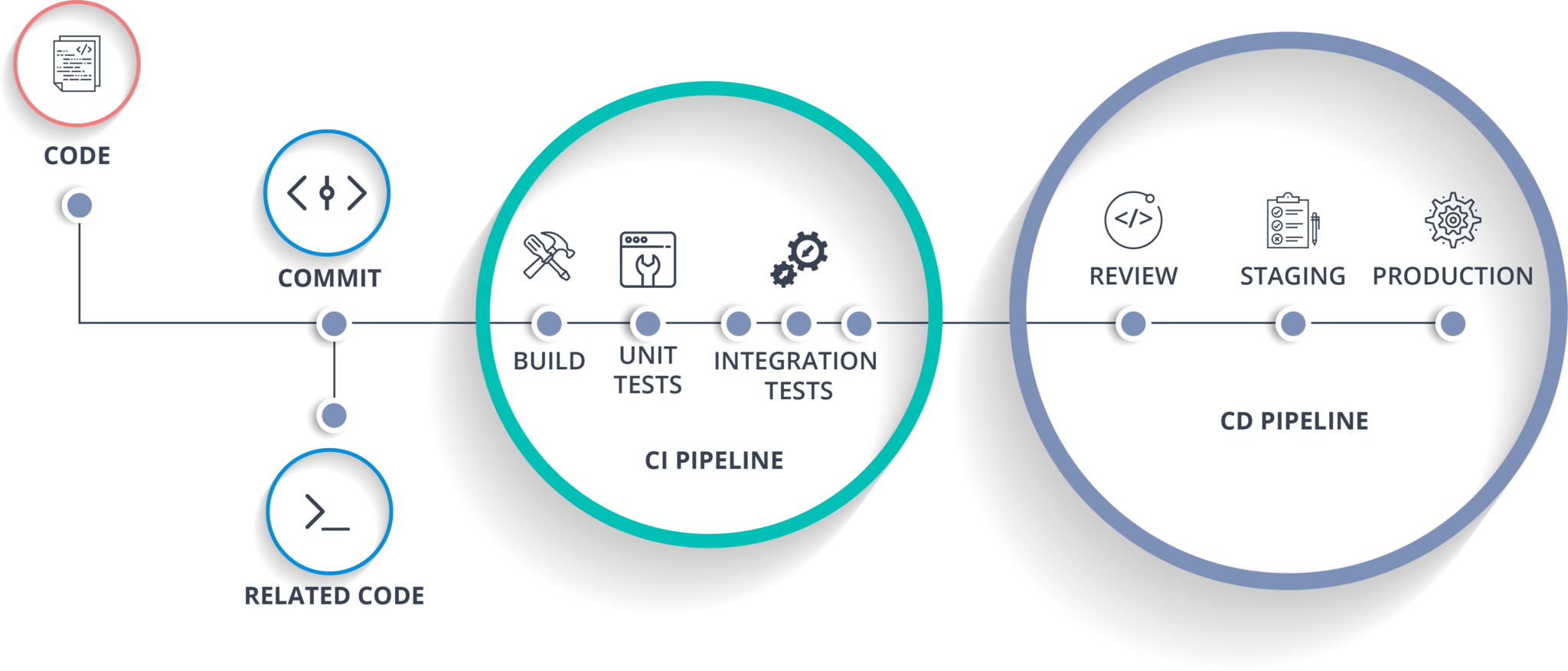
    https://cdn.sanity.io/images/lofvu8al/production/e37ce13c88889f048aa2b1acae7d6cbfeea5678f-2048x876.png

    The world of software development has changed rapidly in the last decade, and as a result, companies today must deliver updates faster, resolve issues quickly, and maintain application stability at all times. Because of these demands, modern engineering teams heavily rely on CI/CD, one of the most important pillars of DevOps. Although it may sound complex at first, CI/CD becomes far easier to understand when broken down clearly. Therefore, this blog explains everything about CI/CD in simple terms, yet with deep technical clarity, so you can understand how it works and why it matters.


    What Is CI/CD in DevOps?

    CI/CD stands for Continuous Integration and Continuous Delivery/Deployment. While both concepts are closely connected, each plays a unique role in automating and accelerating the software development lifecycle. In simple terms, CI/CD helps teams build, test, and deliver software updates continuously instead of waiting for long release cycles. As a result, issues are detected earlier, features are delivered faster, and the overall software quality improves significantly.

    Although CI/CD is a DevOps practice, it also supports agile development, cloud computing, microservices architecture, and modern application deployments. Moreover, because the process is highly automated, it minimizes human errors and ensures consistency.


    Why CI/CD Matters in Today’s Engineering Teams

    Before diving deeper into CI and CD, it is essential to understand why CI/CD is necessary. Previously, software development followed long cycles where developers wrote large chunks of code and merged them weeks or months later. However, this approach caused frequent conflicts, more bugs, and high deployment failures. Furthermore, teams struggled to deliver updates quickly.

    With CI/CD, code is integrated, tested, and delivered continuously. As a result, problems are detected early, release cycles become shorter, and developers can focus more on innovation rather than repetitive manual tasks. Additionally, operations teams benefit from predictable deployments and fewer system failures.

    Consequently, CI/CD has become a standard practice for startups, large enterprises, and global tech giants.


    Understanding Continuous Integration (CI)

    Continuous Integration is the process where developers frequently merge their code changes into a shared repository, often several times a day. As soon as code is pushed, an automated system triggers the build, executes tests, checks quality, and ensures that everything works as expected. Because this happens instantly, developers are notified of issues early before they become major problems.

    Key characteristics of CI

    • Developers integrate code frequently
    • Builds and tests run automatically
    • Issues are detected early
    • Code quality is consistently checked
    • Integration conflicts become minimal

    CI workflow

    To understand CI better, consider the following flow:
    First, a developer writes code and pushes it to GitHub or GitLab. Immediately after that, the CI tool automatically pulls the code, runs a build, executes unit tests, and performs static code analysis. If the build fails, the developer fixes the issue. If it passes, the pipeline moves forward.

    Common CI tools

    • Jenkins
    • GitHub Actions
    • GitLab CI
    • CircleCI
    • Bitbucket Pipelines

    Because CI ensures early validation, teams avoid expensive errors and maintain a stable codebase throughout development.


    Understanding Continuous Delivery (CD)

    Continuous Delivery is the next stage after Continuous Integration. Although CI ensures that the code is tested and validated, CD ensures that the application is always in a deployable state. However, in Continuous Delivery, the actual deployment to production still requires manual approval.

    In other words, once the CI pipeline completes successfully, CD prepares the software for release. It automates packaging, artifact storage, versioning, environment preparation, and configuration management. As a result, the application can be deployed at any time with a single click.

    Important characteristics of Continuous Delivery

    • Applications remain production-ready at all times
    • Deployment requires manual approval
    • Release pipelines are automated
    • Rollback processes are prepared
    • Environments are consistent

    Tools for Continuous Delivery

    • Jenkins
    • Argo CD
    • Spinnaker
    • GitHub Actions
    • GitLab CD

    Although Continuous Delivery reduces deployment friction, it still maintains human oversight for critical production releases.


    Understanding Continuous Deployment (also CD)

    Continuous Deployment is an advanced stage of automation where software is automatically deployed to production after it passes all tests. Unlike Continuous Delivery, no manual approval is required. Therefore, every code change that successfully passes the pipeline reaches production instantly.

    Because of this, Continuous Deployment is used by companies that release updates many times a day, such as Netflix, Amazon, Google, and Facebook.

    Characteristics of Continuous Deployment

    • Fully automated deployment
    • No manual approvals
    • Very fast release cycles
    • Immediate user feedback
    • High level of reliability required

    Tools for Continuous Deployment

    • Argo CD
    • FluxCD
    • Jenkins X
    • Spinnaker

    Most organizations begin with Continuous Delivery and eventually move to Continuous Deployment once they build strong automation and testing practices.


    Difference Between CI, Continuous Delivery, and Continuous Deployment

    While CI, CD (Delivery), and CD (Deployment) may sound similar, they perform different functions. Understanding these differences is essential for building a complete DevOps pipeline.

    Comparison Table

    StageAutomatedDeployment TypePurpose
    Continuous IntegrationYesNoMerge and test code frequently
    Continuous DeliveryYesManual production deploymentKeep the application production-ready
    Continuous DeploymentYesAutomatic production deploymentRelease updates instantly without human approval

    Although the naming is similar, the level of automation increases from CI → CD (Delivery) → CD (Deployment).


    How CI/CD Pipelines Work (Step-by-Step)

    To understand CI/CD practically, it is helpful to look at how a pipeline operates from start to finish. Although pipelines may vary depending on tools and business needs, most follow these steps:

    1. Developer writes code
    2. Code is committed and pushed to Git
    3. CI tool detects the commit
    4. Automated build runs
    5. Unit tests are executed
    6. Static code analysis is performed
    7. Build artifacts are stored
    8. CD pipeline deploys to staging
    9. Integration and performance tests run
    10. Production deployment happens (manual or automatic)
    11. Monitoring tools track system behavior
    12. Feedback loops back to development

    Because this entire process is automated, releases become faster, more consistent, and more reliable.


    Benefits of CI/CD in DevOps

    CI/CD offers a wide range of benefits that directly improve the speed and quality of software delivery. Moreover, these advantages extend to both development and operations teams.

    Major benefits include:

    • Faster and more reliable software releases
    • Early detection of bugs and issues
    • Reduction in manual effort
    • Decreased deployment failures
    • Higher development productivity
    • Improved collaboration
    • Faster incident recovery
    • Better user satisfaction
    • Higher release frequency
    • Stable and predictable production systems

    Furthermore, CI/CD promotes a culture of automation, experimentation, and continuous improvement, which aligns perfectly with DevOps principles.


    Real-World Example of CI/CD in Action

    Consider a team building a cloud-based e-commerce application. As developers work on new features, they continuously push updates to GitHub. Each time they commit, the CI pipeline automatically builds the application, runs tests, and verifies quality. Once the build succeeds, the CD system packages the application and deploys it into a staging environment. After final testing and approval, the updates are released to production. If the organization uses Continuous Deployment, the system pushes changes to production automatically without waiting for approval.

    Because of this automated flow, the team delivers updates more frequently, reduces downtime, and maintains a high level of reliability.


    Conclusion

    CI/CD is one of the most crucial components of DevOps because it ensures that software is developed, tested, and delivered in a continuous, reliable, and automated manner. Although it may seem complex at first, CI/CD becomes powerful once you understand its purpose and workflow. With the right tools and practices, organizations can reduce risk, deliver updates faster, and significantly improve software quality. As a result, CI/CD has become a global standard for companies seeking efficient, scalable, and modern engineering workflows.

    Next Steps :

  • DevOps Lifecycle: A Complete, Detailed Guide for Beginners and Professionals

    devops lifecycle diagram :

    https://www.solutelabs.com/_next/image?q=75&url=https%3A%2F%2Fcdn.sanity.io%2Fimages%2F0mnqm898%2Fproduction%2Ff9479905b3941aec963a30a36a0a5fd44584c0ed-800x543.png&w=3840

    The DevOps lifecycle represents a continuous and collaborative approach to software development and IT operations. It aims to deliver high-quality software at a faster pace, with maximum reliability, stability, and efficiency. The lifecycle includes a series of repeated phases such as planning, coding, building, testing, releasing, deploying, operating, and monitoring. All these steps work together in a continuous loop, ensuring that feedback from each stage is used to improve the next iteration.

    This model is used by highly successful technology companies and has become a global standard for modern engineering teams. Understanding each stage deeply is essential for becoming an effective DevOps engineer or building high-performing software systems.


    What Is the DevOps Lifecycle?

    The DevOps lifecycle is a structured sequence of processes that guide teams in developing, releasing, and maintaining applications. Unlike traditional development models that follow long cycles and isolated teams, DevOps encourages continuous collaboration between development and operations teams. This lifecycle is often illustrated as an infinite loop, representing constant improvement and uninterrupted delivery.

    Each stage focuses on specific tasks, tools, and responsibilities, but they all connect back to the central goal: delivering software quickly and reliably.


    The Eight Stages of the DevOps Lifecycle

    Below is a detailed explanation of each phase and its importance.


    1. Plan

    The lifecycle begins with planning. During this phase, teams identify the requirements, define project scope, prioritize tasks, and align on business goals andEffective planning ensures that development efforts move in the right direction and that all stakeholders share the same understanding.

    Activities in this stage include roadmap creation, sprint planning, requirement documentation, and architectural discussions.

    Tools commonly used: Jira, Confluence, Trello, Notion, Asana.


    2. Code

    In this stage, developers write the application code based on the planned features. This includes following coding standards, maintaining best practices and using version control systems to collaborate efficiently.

    Version control allows developers to manage code changes, create branches, review code, and merge contributions without conflict and also Clean, well-structured code helps reduce bugs and supports long-term maintainability.

    Tools commonly used: Git, GitHub, GitLab, Bitbucket, VS Code and also IntelliJ IDEA.


    3. Build

    Once the coding phase is completed, the build stage compiles source code into executable artifacts. This may include packaging, running static code analysis, applying dependency managemen and also performing automated unit tests.

    Automated build pipelines reduce manual work, decrease human error, and ensure that every change is validated immediately. Continuous Integration (CI) practices are heavily applied here.

    Tools commonly used: Jenkins, GitHub Actions, GitLab CI/CD, CircleCI, Maven, Gradle.


    4. Test

    Testing is a critical part of the lifecycle, ensuring that new features, updates and also changes do not break existing functionality. Automated testing helps detect bugs early before reaching production environments.

    Different types of testing include functional testing, regression testing, integration testing, load testing, API testing, security testing, and performance testing.therefore so many testing included in software lifecycle.

    Tools commonly used: Selenium, JUnit, Postman, SoapUI, SonarQube, JMeter, Cypress.


    5. Release

    After testing, the software moves into the release stage. Here, the application is prepared for deployment, versioning is applied, and approvals are obtained based on organizational policies. Release automation ensures consistency and reduces deployment risks.

    A controlled release process creates confidence that deployments will proceed smoothly.

    Tools commonly used: Jenkins, Argo CD, Spinnaker, GitOps pipelines.


    6. Deploy

    The deployment stage delivers the application into production or staging environments. DevOps aims for automated, reliable, and zero-downtime deployments. Deployment techniques such as rolling updates, blue-green deployments, and canary releases are often used.

    Infrastructure as Code (IaC) is applied to manage servers, networks, and cloud configuration in a repeatable and consistent manner.

    Tools commonly used: Docker, Kubernetes, Terraform, Ansible, AWS, Azure, Google Cloud.


    7. Operate

    After deployment, the application is now running in production. The operations team ensures that systems function efficiently and reliably. Operational tasks include managing servers, handling configurations, maintaining system uptime, and ensuring application performance.

    This stage focuses on reliability, performance optimization, infrastructure health, and routine maintenance.

    Tools commonly used: Kubernetes, Linux servers, configuration management tools and also cloud dashboards.


    8. Monitor

    Monitoring ensures continuous visibility into the application and infrastructure. It helps detect issues early, track performance, analyze logs, and understand user behavior. Effective monitoring allows teams to make informed decisions, avoid downtime, and improve system reliability.

    Insights from monitoring feed directly back into the planning stage, completing the DevOps loop.

    Tools commonly used: Prometheus, Grafana, ELK Stack, Datadog, AWS CloudWatch, Splunk.


    Why the DevOps Lifecycle Is Represented as an Infinite Loop

    https://media.bitcot.com/wp-content/uploads/2023/07/devops-infinity-loop-steps.jpg

    6

    The infinite loop symbolizes continuous improvement. Unlike traditional models where development ends after release, DevOps practices ensure that teams constantly refine and enhance applications based on real-time feedback.

    The loop also emphasizes the following principles:

    • Continuous integration and continuous delivery
    • Consistent improvement
    • Seamless collaboration between teams
    • Rapid delivery cycles
    • Reliable and stable operations
    • Fast recovery from failures

    This continuous loop also helps maintain high product quality and supports organizational agility.


    Benefits of Following the DevOps Lifecycle

    Organizations that adopt a proper DevOps lifecycle experience several advantages:

    • Faster software delivery
    • Enhanced collaboration between teams
    • Early detection of bugs and issues
    • Improved operational stability
    • Reduced deployment failures
    • Streamlined development workflows
    • Higher customer satisfaction
    • Better utilization of automation
    • Increased business competitiveness
    • Continuous innovation

    Real-World Example of the DevOps Lifecycle

    Consider a team building a cloud-based web application. First, the team plans features and improvements. Developers then write the code and push it to a version control system. A CI tool automatically builds and tests the application. After quality checks, the app is released and deployed to a cloud platform using IaC and automated pipelines. The operations team maintains system performance also monitoring tools track logs, errors, and usage behavior. This feedback goes back to the planning stage, resulting in constant improvements.

    This cycle repeats for every new update, allowing the team to deliver features faster and maintain system reliability. This is the exact process followed by leading companies across the world.


    Conclusion

    The DevOps lifecycle is a powerful model that brings development and also operations teams together to achieve continuous improvement and rapid delivery. By understanding each stage and applying the appropriate tools, organizations can build highly scalable, efficient, and also stable software systems. This lifecycle encourages automation, collaboration, feedback, and performance optimization. Whether you are a beginner learning DevOps or an experienced engineer looking to refine your approach, mastering the DevOps lifecycle is a fundamental step toward building world-class systems.

  • What Is DevOps? A Complete Beginner-Friendly Guide 2026

    A clear and simple explanation of DevOps—what it is, how it works, lifecycle, practices, tools, benefits, challenges, and how to get started.


    Introduction

    Modern businesses demand software that is fast, reliable, and continuously improving. Traditional development methods created delays because development and operations teams worked separately. DevOps solves this problem by combining both teams into a unified, collaborative workflow.

    DevOps is not a single tool or a role. It is a mindset and a set of practices that help teams deliver software faster and more reliably.


    What Is DevOps?

    DevOps is a combination of cultural philosophies, practices, and tools that integrate software development (Dev) and IT operations (Ops).

    It focuses on:

    • Collaboration between teams
    • Reducing manual work through automation
    • Delivering features faster
    • Improving software quality
    • Ensuring stable and reliable operations

    Before DevOps, development teams wrote the code, and operations teams deployed and maintained it. This separation caused slow releases and frequent production issues. DevOps removes this gap.


    How DevOps Works

    Under the DevOps model:

    • Development and operations teams work as a single unit.
    • Engineers take responsibility for the full application lifecycle.
    • Automation tools speed up builds, testing, deployments, and monitoring.
    • Feedback loops ensure continuous improvement.
    • Security is integrated from day one, forming DevSecOps.

    The DevOps Lifecycle (Infinity Loop Overview)

    The DevOps lifecycle is represented by an infinity loop that highlights continuous and connected phases.

    1. Discover

    • Teams explore ideas, understand requirements, and identify customer needs.

    2. Plan

    • Work items are divided into smaller tasks using Agile methods such as sprints and backlogs.

    3. Build

    • Developers write code and manage changes using version control systems like Git.

    4. Test

    • Continuous Integration (CI) runs automated tests each time code is merged, ensuring quality early.

    5. Deploy

    • Continuous Deployment (CD) automatically releases new features into production or staging environments.

    6. Operate

    • Teams manage infrastructure, servers, and application environments.

    7. Observe

    • Monitoring tools track logs, metrics, and application performance.

    8. Continuous Feedback

    • Teams analyze feedback from monitoring, incidents, and user behavior to improve the next release.

    DevOps Tools

    DevOps toolchains support every stage of the lifecycle.

    Common DevOps Tools by Category:

    Version Control

    • Git, GitHub, GitLab, Bitbucket

    CI/CD

    • Jenkins, GitHub Actions, GitLab CI, CircleCI, Bitbucket Pipelines

    Configuration Management

    • Ansible, Puppet, Chef

    Containers

    • Docker

    Orchestration

    • Kubernetes

    Infrastructure as Code (IaC)

    • Terraform, AWS CloudFormation, Pulumi

    Monitoring & Observability

    • Prometheus, Grafana, ELK Stack, Datadog, New Relic

    Collaboration & Tracking

    • Jira, Confluence, Slack

    Toolchain Approaches

    • All-in-one platforms (example: GitLab, Azure DevOps)
    • Open toolchains that combine multiple tools (example: Jira + GitHub + Jenkins + Kubernetes)

    Benefits of DevOps

    Faster Releases

    • High-performing DevOps teams deploy code significantly faster due to automation and continuous delivery.

    Improved Collaboration

    • Development, operations, and security teams work collaboratively instead of separately.

    Rapid Deployment and Innovation

    • Frequent releases allow teams to introduce new features and fix issues quickly.

    Higher Software Quality

    • Automated testing and continuous integration reduce bugs and increase reliability.

    Enhanced Security

    • DevSecOps integrates security testing and scanning into every stage of the pipeline.

    Better Customer Satisfaction

    • Reliable applications and faster improvements improve the overall customer experience.

    Challenges of Adopting DevOps

    Cultural Resistance

    • Moving from siloed teams to collaborative work requires mindset changes.

    Misunderstanding DevOps as Only Tools

    • DevOps requires cultural change and processes, not just installing tools.

    Legacy Systems

    • Migrating from old systems to automated pipelines, IaC, and microservices can be complex.

    Operational Complexity

    • Microservices and distributed systems require strong monitoring and observability.

    Core DevOps Practices

    Continuous Integration (CI)

    • Automates code integration, testing, and early bug discovery.

    Continuous Delivery (CD)

    • Automates software deployment steps to staging and production environments.

    Automation

    • Reduces manual work in builds, testing, deployments, monitoring, and scaling.

    Infrastructure as Code (IaC)

    • Treats infrastructure definitions as code for consistency and repeatability.

    Microservices

    • Breaks applications into small, independent services that are easier to deploy and manage.

    Monitoring and Observability

    • Tracks performance and health metrics across the entire system lifecycle.

    How to Start With DevOps

    Begin with a small application

    • Choose one service or project to experiment with DevOps practices.

    Introduce Continuous Integration

    • Start by setting up automated builds and tests.

    Add automation step-by-step

    • Automate deployments, infrastructure provisioning, and monitoring gradually.

    Adopt Infrastructure as Code

    • Use Terraform, CloudFormation, or similar tools.

    Improve monitoring

    • Implement dashboards, logging, alerting, and tracing.

    Expand DevOps culture

    • Scale the practices across other teams once the foundation is stable.

    Conclusion

    DevOps is a transformative approach that connects development and operations teams, enabling faster delivery, higher quality, and more reliable software systems. It emphasizes collaboration, automation, and continuous improvement.

    By adopting DevOps practices, organizations can innovate quickly, reduce failures, enhance security, and provide a better experience for users. Starting small and building a strong foundation of automation and monitoring can help any team successfully implement DevOps

    Next Steps :

  • Jacket for Men Review Best Lightweight Jacket Under ₹800 (2025)

    Looking for a stylish, affordable, and lightweight jacket for daily wear? The Lymio Jacket (J-04-06) is one of the hottest-selling options on Amazon — and for good reason.

    In this detailed review, we break down its design, comfort, quality, pros & cons, and whether this jacket is worth your money.

    Buy Now on Amazon: https://amzn.in/d/8X1XVOi


    Why This Jacket Is Trending on Amazon

    The Lymio Jacket is currently a #1 Best Seller in men’s jackets and has been bought by 600+ customers in the last month.

    Here’s why it is getting so much attention:

    • Massive 85% discount
    • Stylish premium looks
    • Lightweight and comfortable for daily use
    • Budget-friendly price under ₹800
    • High demand in the winter & travel season

    Design & Style (First Impression)

    The jacket features a premium casual look that suits all outfits — jeans, t-shirts, joggers, formals, and even office wear.

    Modern stand-up collar

    Clean zipper design

    Stylish striped cuffs

    Zipped pockets for convenience

    The Green colour is the most popular because it looks classy and easily matches most wardrobe styles.


    Comfort, Fit & Material Quality

    This jacket is perfect for:

    • Light winters
    • Evening walks
    • Daily college/office wear
    • Travel
    • Casual outings

    The inner lining is soft, and the material is lightweight, breathable, and comfortable.

    If you prefer a slightly loose fit, order one size up.


    Price Breakdown (Huge Discount)

    • M.R.P: ₹4,999
    • Deal Price: ₹749
    • You Save: 85%

    Plus additional offers:

    • Cashback on Amazon Pay
    • Credit card discounts
    • Free delivery options
    • 10-day return & exchange

    Check Latest Price on Amazon: https://amzn.in/d/8X1XVO


    Build Quality & Durability

    For the price, the quality is surprisingly good:

    • Strong stitching
    • Smooth zipper
    • Durable cuffs and collar
    • Fabric doesn’t wrinkle easily

    However, this is a lightweight jacket, so it is not meant for:

    • Heavy winter
    • Extreme cold
    • Adventure sports

    Who Should Buy This Jacket?

    Best for:

    ✔ College students
    ✔ Software engineers
    ✔ Men who need a daily-use jacket
    ✔ Light winter or mild cold
    ✔ Bike riders (short distance)
    ✔ Budget buyers

    Not recommended for:

    ✘ Extremely cold places
    ✘ Heavy winter protection


    Pros & Cons

    Pros

    • Amazing value for money
    • Lightweight and stylish
    • Perfect for daily wear
    • Good pocket space
    • Premium-looking design

    Cons

    • Not meant for harsh winters
    • Fabric is thin (lightwear)
    • Colour shades may vary

    Final Verdict – Should You Buy It?

    If you want a budget-friendly casual jacket that looks stylish, feels comfortable, and works well for daily use, the Lymio Jacket (J-04-06) is one of the best options under ₹800.

    It offers premium looks at a pocket-friendly price — perfect for college, office, travel, or casual evenings.


    Buy the Lymio Lightweight Jacket on Amazon:
    https://amzn.in/d/8X1XVOi

  • IND vs SA : The Day India Fought Fire With Fire , A Historic India vs South Africa Moment That Still Gives Goosebumps

    India vs South Africa is not just a cricket rivalry.IND vs SA
    It is courage vs challenge, technique vs raw pace, and respect vs fierce competition.
    Two nations. Two cricketing cultures. And endless unforgettable moments.

    But among all these memories, one moment stands above the rest—
    The Eden Gardens Miracle of 2010
    .

    A moment that still makes Indian fans smile…
    And South African fans admire the brilliance.

    Let’s relive it.


    The Build-Up: South Africa Dominates the First Test

    The 2010 Test series began with pure destruction.

    • South Africa crushed India by an innings in Nagpur.
    • Dale Steyn bowled one of his greatest spells ever: 7/51.
    • Hashim Amla was unstoppable with back-to-back centuries.

    The world No. 1 Indian Test team looked lost.

    Critics said:

    “India can’t handle top-tier pace.”
    “This is going to be a whitewash.”

    Eden Gardens was supposed to be the decider of pride.


    Day 1 & 2: South Africa Takes Control Again

    At Kolkata, things didn’t start well either.

    • Amla scored another majestic century.
    • Kallis anchored the innings beautifully.
    • South Africa posted a big total of 296, and India’s reply was shaky.

    But then…

    The match turned into one of the most dramatic comebacks in Test history.


    The Turning Point: Harbhajan Singh’s Roar

    With the crowd roaring like a storm,
    Harbhajan Singh India’s fighter ,turned the Test around.

    He delivered magical spin, ripping through the Proteas lineup:

    • Kallis: Gone.
    • AB de Villiers: Gone.
    • Duminy: Gone.
    • Boucher: Gone.

    Eden Gardens was trembling.

    South Africa went from stable to struggling.

    Harbhajan took 5 wickets and brought India right back into the match.


    But the Real Drama? It Happened on the Final Day.

    South Africa needed to survive the entire Day 5 to save the Test.
    And they almost did.

    This is where the match became legendary.


    Final Hour, Final Over, Final Ball – The Entire World Watching

    South Africa’s last-wicket pair, Hashim Amla and Morne Morkel, fought bravely.

    • Amla was invincible…
    • Morkel was surviving like a wall…

    Minutes turned into seconds.
    Overs turned into heartbeats.

    The match reached the final over of the 5th day.

    Everyone in the stadium stood up.
    Millions glued to TV.
    Commentators breathless.

    Harbhajan Singh ran in…


    The Moment: Harbhajan Traps Morkel – India Win on the Last Possible Ball

    A flighted delivery.
    Sharp turn.
    Big appeal.

    Out!!!!

    Morne Morkel was trapped LBW.
    Hashim Amla remained unbeaten on 123*—one of the greatest fighting knocks ever.
    But India won the match.

    India won the Test on the final ball of the five-day match.

    You read that right.

    The VERY LAST BALL.

    Eden Gardens exploded.
    The commentary box exploded.
    The cricket world exploded.

    This wasn’t just a win.
    This was Test cricket at its peak.


    Why This Match Is So Special in IND vs SA History

    • It had superstars at their best – Amla, Steyn, Sehwag, Laxman, Harbhajan.
    • It was a comeback after humiliation in the first Test.
    • It showed India’s fighting spirit and South Africa’s resilience.
    • It ended on the last ball of Day 5, a once-in-a-lifetime moment.
    • It preserved India’s world No. 1 Test ranking.

    This Test was everything cricket is meant to be—
    Drama, passion, skill, courage, and heart.


    Final Thought

    Whenever India and South Africa face each other—
    whether it’s a Test, ODI, T20, or A match
    fans remember the fierce battles, the mutual respect, and the unforgettable history.

    But the Eden Gardens Miracle of 2010
    remains one of the greatest cricket stories ever told.

    A story where both teams played like warriors,
    but destiny chose its winner on one final ball.