You have probably heard the term Agentic DevOps in the last few months. It sounds complicated, but the idea is simple. In this guide, I explain it in plain English, with easy examples, so a beginner can follow it and an experienced DevOps engineer can use it.
If you are new to DevOps, start with my DevOps roadmap first. It will make this article much easier.
The problem DevOps is trying to solve today
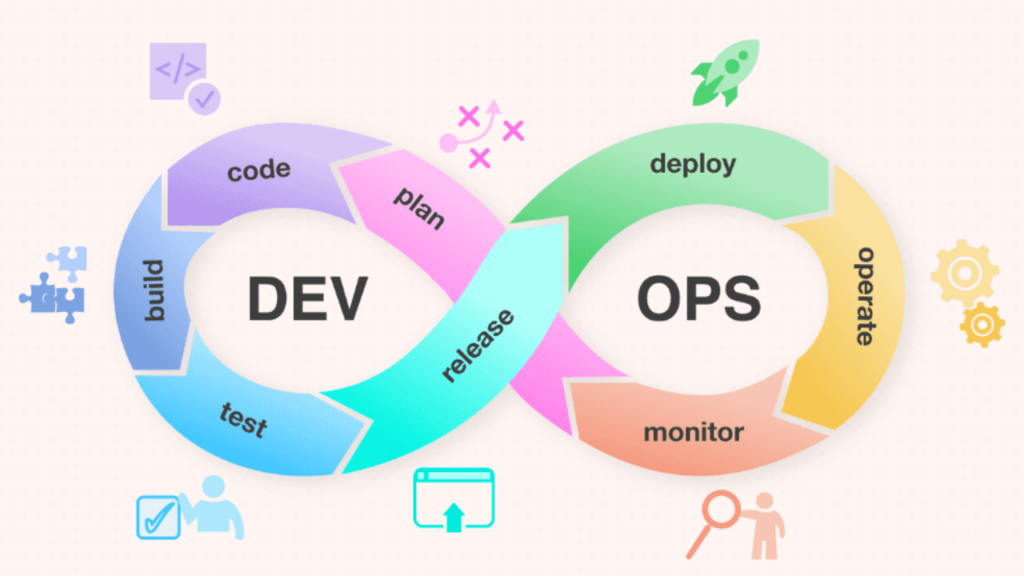
DevOps already gave us a lot: automated builds, automated tests, automated deployments, Infrastructure as Code and monitoring dashboards. (If you want a refresher, read my guide to CI/CD in DevOps.)
But modern systems keep growing. A single application can run across many cloud services, hundreds of containers, several databases and dozens of APIs. When something breaks, the cause is often not obvious. Engineers lose time jumping between logs, dashboards, tickets and chat messages just to understand what happened.
Automation helps, but it has a limit. Normal automation can only do what someone already wrote down. It cannot think about a new situation.
A simple way to understand it: recorded directions vs a GPS
Imagine two ways to reach a destination.
- Recorded directions: “Turn left after 200 metres, then turn right at the signal.” These work perfectly until a road is closed. Then you are stuck.
- A GPS: You give it the destination. It reads the traffic, picks a route and finds a new one if the road is blocked.
Traditional automation is the recorded directions. Agentic DevOps is closer to the GPS. You give the system a goal, such as “get the application healthy again”, and it works out the steps.
So what is Agentic DevOps?
Agentic DevOps means using AI agents to help run the software lifecycle: building, testing, deploying and operating applications.
An AI agent is a program that uses an AI model to do four things:
- Look at what is happening (logs, metrics, pipeline results)
- Think about what the problem might be
- Use tools to take actions (run a command, open a ticket, restart a service)
- Check whether the action worked
The important word is goal. A script follows steps. An agent works toward a result.
Automation vs agent: a real example
Let’s say a production server is running out of disk space.
With normal automation
You wrote one rule: “If disk usage is above 90%, delete log files older than 7 days.” That works when old logs are the problem. But what if the disk is filling for a different reason? The rule runs, the disk stays full, and an engineer gets paged at 2 a.m.
With an agent
The agent receives the goal: “Fix the disk space problem safely.” Then it can:
- Check which folder grew the most in the last few hours
- Notice that one service started writing huge debug logs right after yesterday’s release
- Suggest turning the log level back to normal and cleaning the extra logs
- Ask an engineer to approve the configuration change
- Check the disk usage again to confirm it is dropping
The agent did not follow a fixed script. It investigated, chose an action and verified the result. A human still approved the risky step.
The agent loop: Observe, Understand, Plan, Act, Verify
Most agents follow the same loop, and you can remember it in five words:
| Step | What the agent does | Example |
|---|---|---|
| Observe | Collects information | Reads logs, metrics and recent deployments |
| Understand | Works out what is wrong | Finds that latency started after a release |
| Plan | Decides what to do | Proposes a rollback of one service |
| Act | Uses a tool | Runs the rollback after approval |
| Verify | Checks the result | Confirms latency is back to normal |
The last step matters most. An agent that acts but never checks is dangerous.
What does an agent need to work?
An AI model alone is not enough. A useful DevOps agent needs three things.
1. Tools. These are the things it is allowed to use, such as kubectl, Git, your CI/CD system, cloud APIs and your monitoring tool.
2. Context. Your production system is not generic. The agent needs to know your architecture, your deployment rules and which services depend on which. Without context, its answers may be correct in theory but wrong for your system.
3. Permissions. This is the most important one. Give the agent only the access it needs, and nothing more. In security this is called the principle of least privilege. (My post on DevSecOps explains why this matters.)
Humans stay in the loop
A common fear is that AI will run everything with no human control. In good setups, that is not the plan. Smart teams decide which actions an agent can take alone and which need approval.
A simple way to think about it:
- Safe to do alone: reading logs, listing pods, checking metrics, summarising an incident, drafting a report
- Allowed with limits: small, easily reversible changes in a test or development environment
- Needs human approval: changing production, deleting data, changing access permissions, scaling expensive resources
The goal is not to remove engineers. It is to save their time on boring investigation work so they can spend it on decisions that need judgment.
Many agents, one team
Some setups use several small agents, each with one job, like a hospital team. A general doctor sees the patient first, a specialist looks deeper, and the lab runs tests.
In DevOps, one agent might watch monitoring data, another might check recent deployments, another might look at cloud resources, and a coordinator combines their findings into one recommendation. Each agent stays focused, and the combined answer is more useful than a long list of alerts.
A tiny example you can try (read-only and safe)
Here is a very simplified idea of an agent tool. It can only look at Kubernetes pods. It cannot change anything.
import subprocess

def check_pods(namespace):
    # Read-only tool: it can look, but it cannot change anything
    result = subprocess.run(
        ['kubectl', 'get', 'pods', '-n', namespace],
        capture_output=True, text=True
    )
    return result.stdout

def ask_ai(question):
    ...  # send the question to the AI model you use

pods = check_pods('production')
print(ask_ai('Which of these pods look unhealthy, and what should I check first? ' + pods))
This is a learning sketch, not production code. But it shows the pattern: a tool gathers facts, the AI helps explain them, and a human decides what to do.
Risks you should know about
Agentic DevOps is useful, but it is not magic. Be careful about these points:
- Wrong answers. AI models can sound confident and still be wrong. Always verify before a risky action.
- Too much access. An agent with admin rights can cause a big outage by mistake. Start with read-only access.
- Bad input. Agents read logs and tickets. Text inside them can be misleading, and in some cases written to trick the agent. Treat that data as untrusted.
- Secrets. Do not let an agent see or print passwords, tokens or keys.
- No record. Keep a log of everything the agent did, so you can review it later.
What this means for DevOps engineers
The fundamentals still matter. You cannot supervise an agent if you do not understand what it is doing. The people who benefit most will be engineers who know the basics well and also know how to use agents as helpers.
Routine work, such as searching through logs or writing repeated configuration, may get faster with help from AI. In exchange, engineers need new skills: designing safe workflows, choosing the right tools for an agent, setting permissions and checking the agent’s decisions.
What students should learn first
If you are a student, do not try to learn “agents” before the basics. Follow this order:
- Linux and networking. Everything runs on it.
- Git and CI/CD. See how code reaches production.
- Docker and Kubernetes. Learn how modern apps run.
- Infrastructure as Code. Tools like Ansible or Terraform. (Try my Ansible guide.)
- Monitoring and reliability. Learn about metrics, logs and SLIs, SLOs and SLAs.
- Python scripting. The glue language of DevOps.
- AI basics. Understand what a language model can and cannot do, and how to call one through an API.
Then build a small read-only project like the example above. A working mini-project is worth more on a resume than a list of buzzwords.
Frequently asked questions
What is Agentic DevOps in one line? It is DevOps where AI agents can observe systems, plan actions and carry them out with the right tools and approvals, instead of only following fixed scripts.
Is it the same as AIOps? They are related. AIOps mainly uses AI to analyse data and spot problems. Agentic DevOps goes a step further, because the agent can also plan and take actions toward a goal.
Will it replace DevOps engineers? Nobody can say exactly how roles will change, but the sensible view is that the work shifts. Engineers who understand the fundamentals and can supervise automation will stay valuable.
Do I need to learn AI before I learn DevOps? No. Learn DevOps fundamentals first. Add AI basics after that.
Is it ready for production? Maturity varies a lot between teams and tools. A sensible approach is to start with read-only tasks, keep humans approving risky actions, and expand slowly.
What is a good first project? Build a read-only agent that checks your own test cluster, summarises problems and suggests what to check. Never give it write access at the start.
Final thoughts
Agentic DevOps is not a replacement for everything you already know. It is a new layer on top of CI/CD, Infrastructure as Code, containers and monitoring. The basic idea is simple: give the system a goal, let it investigate with safe tools, and keep a human in charge of the decisions that matter.
Learn the fundamentals, practise on small projects, and stay curious.
Leave a Reply