The Ingress NGINX controller has been retired, and many teams are still running it. This guide gives you a practical, step-by-step migration path to Kubernetes Gateway API, with working-style YAML, a safe cutover plan and the traps that cause outages.
The situation in one minute
- The Kubernetes project announced in November 2025 that Ingress NGINX would be retired in March 2026. After that, there are no more releases, bug fixes or security patches. Existing deployments keep running, and the install files stay available.
- In January 2026, the Kubernetes Steering and Security Response Committees issued a joint statement saying that about half of cloud native environments relied on it, based on Datadog research, and urged teams to plan migration.
- Since we are now in November 2026, the retirement has already happened. If you still run it, you are running unpatched software at the edge of your cluster.
- The Kubernetes project recommends Gateway API, the modern replacement for Ingress. You can also move to another maintained Ingress controller if you are not ready.
This guide focuses on the main path: Ingress NGINX to Gateway API using the official ingress2gateway tool, with a safe cutover. If you are new to Kubernetes networking, read my guides on ports and protocols and TLS certificates first.
Important: The YAML in this guide is simplified for learning. Class names, annotations and some features depend on the controller you choose. Test everything in a non-production cluster first, and never apply generated manifests to production without review.
Before you start: two things people mix up
1. Ingress NGINX is not the same as NGINX Ingress. The Kubernetes blog points out that these are two separate controllers. Ingress NGINX is the community project that was retired. NGINX Ingress Controller is a separate product from F5, and it is not covered by this retirement. Check which one you run.
2. You do not have to use Gateway API. The Ingress API itself still exists. If you need a quick fix, you can switch to another maintained Ingress controller first, then migrate to Gateway API later. But Gateway API is where the ecosystem is going, so migrating now saves you a second migration.
Gateway API in five minutes
Ingress mixes everything in one object. Gateway API splits it into clear pieces, each owned by a different role.
| Gateway API object | What it is | Usually owned by |
|---|---|---|
| GatewayClass | The type of gateway, tied to a controller | Infrastructure provider |
| Gateway | The actual entry point: ports, protocols, TLS | Platform or cluster team |
| HTTPRoute | Rules that send requests to your services | Application developers |
| ReferenceGrant | Permission to reference objects in another namespace | Owner of the target namespace |
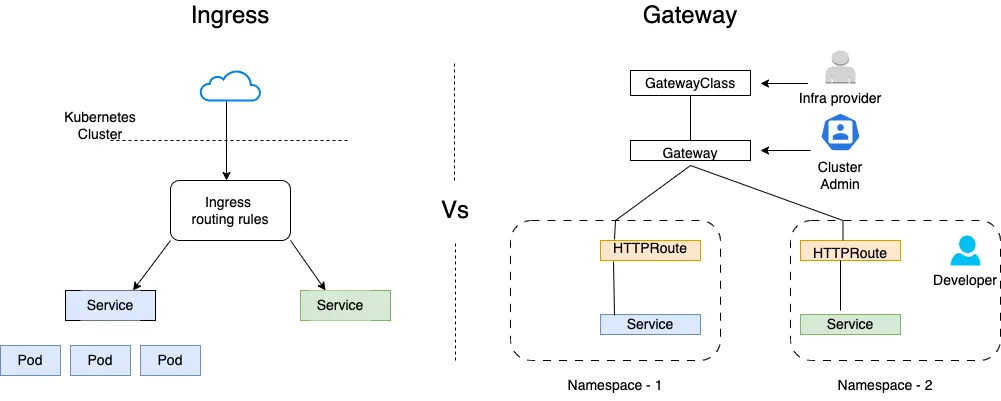
Compare this with Ingress:
| Ingress concept | Gateway API equivalent |
|---|---|
| IngressClass | GatewayClass |
| The load balancer and listeners (hidden inside the controller) | Gateway |
| Ingress rules (host, path, backend) | HTTPRoute |
| Annotations for extra behaviour | Standard filters, or controller-specific policy objects |
The biggest change is the last row. Annotations are replaced by structured fields, and anything without a standard field depends on your controller.
Step 1: Find out what you run
Ask a cluster administrator to run this. The Kubernetes statement suggests checking for the controller pods across all namespaces:
kubectl get pods --all-namespaces --selector app.kubernetes.io/name=ingress-nginxMany teams do not realise they run it, because some managed platforms install it by default. List all your Ingress resources too:
kubectl get ingress --all-namespacesStep 2: Inventory your annotations
Annotations are where migrations go wrong. Count which ones you use:
kubectl get ingress --all-namespaces -o yaml | grep 'nginx.ingress.kubernetes.io' | sort | uniq -c | sort -rnSave this list. It tells you how hard the migration will be. A cluster using only host and path rules is easy. A cluster using many snippets, regex rules and custom timeouts needs more care.
Step 3: Choose a Gateway API controller
Gateway API is a specification, and many controllers implement it. Pick based on what you already run and what your team knows. This table is a starting point, not a recommendation for every setup. Check each project’s documentation for the features you need.
| Option | Good fit when | Things to check |
|---|---|---|
| Envoy Gateway | You want a dedicated Envoy-based Gateway API implementation | Feature gaps against your annotation list |
| kgateway | You want an Envoy-based gateway with extra features | Maturity and support for your use case |
| Cilium Gateway API | You already use Cilium as your network plugin | Needs Cilium configured for Gateway API |
| Istio | You already run, or plan to run, a service mesh | Extra complexity if you only need ingress |
| NGINX Gateway Fabric | You want to stay close to NGINX behaviour | Feature coverage compared with your current setup |
| Traefik | You already use Traefik elsewhere | Gateway API feature support for your needs |
| Cloud-managed options (for example from AWS, Google Cloud or Azure) | You want the cloud provider to run the data plane | Cost, limits and how routes map to cloud load balancers |
The ingress2gateway tool can also produce output tuned for certain controllers (agentgateway, Envoy Gateway and kgateway) using an emitter option.
Decision tip: the smallest, safest change is usually the controller that matches how you already work. Measure your own traffic before trusting someone else’s benchmark.
Step 4: Build a test cluster first
Do not experiment on production. The Kubernetes project has a guide to trying Gateway API on a local kind cluster. Install your chosen controller there, create a GatewayClass, and confirm it reports as accepted. Then copy a simple app of yours into the test cluster.
Check the basics:
kubectl get gatewayclass
kubectl get gateway --all-namespaces
If the GatewayClass is not accepted, nothing else will work.
Step 5: Convert with ingress2gateway
ingress2gateway is the official migration assistant from Kubernetes SIG Network. Version 1.0 was released on March 20, 2026. Before 1.0 it understood only three Ingress NGINX annotations. Version 1.0 supports more than 30 common ones, such as CORS, backend TLS, regex matching and path rewrite.
The project describes it as a migration assistant, not a one-shot replacement. It converts what it can, warns you about what it cannot, and you review the result.
Install it:
brew install ingress2gateway
# or, with Go installed:
go install github.com/kubernetes-sigs/ingress2gateway@v1.0.0
Run it on files or directly on your cluster:
# From files
ingress2gateway print --input-file my-manifest.yaml --providers=ingress-nginx > gwapi.yaml

# One namespace
ingress2gateway print --namespace shop --providers=ingress-nginx > gwapi.yaml

# The whole cluster
ingress2gateway print --providers=ingress-nginx --all-namespaces > gwapi.yaml
Step 6: Read the warnings (this is the real work)
The tool prints warnings next to the generated YAML. Do not skip them. Examples from the official announcement:
- configuration-snippet is not supported. Custom NGINX snippets have no standard Gateway API form. You must find another way in your controller’s documentation.
- Timeouts are a best-effort translation. Ingress NGINX uses TCP-level timeouts, while Gateway API uses a request timeout. Check that the converted value still fits your app.
- Body size limits may not map. Many Gateway API implementations have their own defaults, so you may need a controller-specific setting.
- URL normalisation is not configurable in Gateway API. Check whether your apps depend on it.
- Regex behaviour differs. See the gotchas below.
Step 7: Before and after (a simple example)
Before: an Ingress
apiVersion: networking.k8s.io/v1
kind: Ingress
metadata:
  name: shop
  namespace: shop
  annotations:
    nginx.ingress.kubernetes.io/ssl-redirect: "true"
spec:
  ingressClassName: nginx
  tls:
    - hosts:
        - app.example.com
      secretName: app-example-com-tls
  rules:
    - host: app.example.com
      http:
        paths:
          - path: /api
            pathType: Prefix
            backend:
              service:
                name: api-service
                port:
                  number: 8080
          - path: /
            pathType: Prefix
            backend:
              service:
                name: web-service
                port:
                  number: 80
After, part 1: a Gateway (usually owned by the platform team)
apiVersion: gateway.networking.k8s.io/v1
kind: Gateway
metadata:
  name: web-gateway
  namespace: infra
spec:
  gatewayClassName: your-gateway-class   # depends on your controller
  listeners:
    - name: http
      protocol: HTTP
      port: 80
      allowedRoutes:
        namespaces:
          from: All
    - name: https
      protocol: HTTPS
      port: 443
      hostname: app.example.com
      tls:
        mode: Terminate
        certificateRefs:
          - kind: Secret
            name: app-example-com-tls
      allowedRoutes:
        namespaces:
          from: All
After, part 2: an HTTPRoute (usually owned by the app team)
apiVersion: gateway.networking.k8s.io/v1
kind: HTTPRoute
metadata:
  name: shop
  namespace: shop
spec:
  parentRefs:
    - name: web-gateway
      namespace: infra
      sectionName: https
  hostnames:
    - app.example.com
  rules:
    - matches:
        - path:
            type: PathPrefix
            value: /api
      backendRefs:
        - name: api-service
          port: 8080
    - matches:
        - path:
            type: PathPrefix
            value: /
      backendRefs:
        - name: web-service
          port: 80
part 3: the HTTP to HTTPS redirect
The old annotation did this for you. In Gateway API you create a separate route on the HTTP listener:
apiVersion: gateway.networking.k8s.io/v1
kind: HTTPRoute
metadata:
  name: shop-http-redirect
  namespace: shop
spec:
  parentRefs:
    - name: web-gateway
      namespace: infra
      sectionName: http
  hostnames:
    - app.example.com
  rules:
    - filters:
        - type: RequestRedirect
          requestRedirect:
            scheme: https
            statusCode: 301
Note on certificates: the TLS secret should be in the same namespace as the Gateway. If it is in another namespace, you need a ReferenceGrant (see troubleshooting below).
Annotation cheat sheet
| Ingress NGINX annotation | Gateway API approach |
|---|---|
| ssl-redirect | A RequestRedirect filter on the HTTP listener |
| rewrite-target | A URLRewrite filter (for example ReplacePrefixMatch) |
| canary / traffic splitting | Weights on backendRefs |
| proxy read and send timeouts | Route timeouts (request timeout), best-effort |
| enable-cors | A CORS filter or controller feature; check support |
| use-regex | RegularExpression path match, with behaviour that depends on the controller |
| proxy-body-size | Controller-specific policy or setting |
| whitelist-source-range | Controller-specific policy |
| auth-url and similar auth annotations | Controller-specific external auth feature |
| configuration-snippet | No equivalent. Redesign using filters or controller features |
When a row says “controller-specific”, the answer is in your controller’s documentation, not in the Gateway API standard.
The five gotchas that cause outages
The Kubernetes project published a post called Before You Migrate: Five Surprising Ingress-NGINX Behaviors You Need to Know. The core message: a translation that looks correct can still cause an outage if it ignores Ingress NGINX’s quirks. Here is the short version.
- Regex matches are prefix-based and case-insensitive. An Ingress NGINX regex like /users/(\d+) quietly matches /Users/5 and longer paths. A Gateway API regex path match may be exact and case-sensitive, depending on your implementation. Result: requests that worked before return 404. Decide whether to keep the old behaviour or fix your clients.
- use-regex applies to every path of a host. If one Ingress for a host sets it, other Ingresses for the same host are treated as regex too, across Ingress resources. Check your whole host, not just one file.
- rewrite-target silently implies regex. Adding it enables regex behaviour for the host as well, with the same side effects.
- Missing trailing slash redirects. Ingress NGINX redirects a request without a trailing slash to the path with one, in some setups. Your new gateway may not.
- URL normalisation. Ingress NGINX cleans up paths (for example duplicate slashes and dot segments) before matching. Gateway API does not let you configure this, so behaviour depends on the implementation.
What to do: write test requests for these cases (different capitalisation, trailing slashes, odd paths) and run them against both the old and the new setup before cutover.
Step 8: Run both side by side and test
Do not switch traffic yet. Deploy the new Gateway and routes alongside Ingress NGINX. The new Gateway gets its own load balancer address.
- Get the new address:
kubectl get gateway web-gateway -n infra - Test it without changing DNS, by forcing the hostname to the new address:
curl --resolve app.example.com:443:NEW_LB_IP https://app.example.com/api/health - Compare responses, status codes, headers, redirects and latency with the old path.
- Run your five-gotchas test requests.
- Check that routes are accepted:
kubectl describe httproute shop -n shop
Look for the conditions that say the route is accepted and its references are resolved.
Step 9: Cut over with weighted DNS
A safe zero-downtime plan looks like this:
- Lower your DNS TTL a day or more before, so changes take effect quickly.
- Add a weighted DNS record that sends a small share (for example 5%) to the new load balancer and the rest to the old one. Most DNS providers support weighted routing. (If you use external-dns, check its documentation for Gateway API support.)
- Watch error rate, latency and logs for both paths.
- Increase gradually (for example 25%, 50%, then 100%) as long as the numbers stay healthy.
- Keep a rollback ready. To roll back, move the weight back to the old load balancer.
- Leave Ingress NGINX running for a few days after 100%, so you can recover fast.
Avoid making big application changes during the same window, so if something breaks you know where to look.
Step 10: Clean up
Only after traffic is stable and nobody depends on the old path:
- Remove the old Ingress resources.
- Uninstall the Ingress NGINX controller and its admission webhook.
- Remove leftover DNS records and load balancers.
- Update your runbooks, alerts and documentation.
- Add a monitoring alert that warns if an unmaintained controller ever appears in a cluster again.
Troubleshooting common problems
| Symptom | Likely cause | What to check |
|---|---|---|
| No external address on the Gateway | GatewayClass not accepted, or the controller is not running | kubectl get gatewayclass, controller pods and logs |
| Route exists but traffic does not arrive | The route is not attached to the Gateway | kubectl describe httproute. Check parentRefs, sectionName and the listener’s allowedRoutes |
| 404 only for some paths after cutover | Regex or case-sensitivity differences | The five gotchas. Compare old and new matching |
| 500 or 503 errors | Wrong backend service name or port, or a cross-namespace reference that is not allowed | backendRefs and ReferenceGrant |
| TLS errors | Certificate secret in a different namespace, or wrong hostname | certificateRefs and the secret location |
| Works with curl –resolve but not in the browser | DNS not changed yet, or an old TTL is still cached | DNS records and TTL |
About cross-namespace references
In Gateway API, a route can attach to a Gateway in another namespace only if the Gateway’s listener allows it (allowedRoutes). A route that points to a Service in another namespace, or a Gateway that uses a certificate secret from another namespace, needs a ReferenceGrant created in the target namespace. Without it, the reference is rejected and traffic fails, so always check the route’s status conditions.
Why Gateway API is also a security improvement
Moving is not only about avoiding an unmaintained controller. Gateway API changes how teams share the edge.
- Role separation. Infrastructure teams own GatewayClass, platform teams own Gateway, and app teams own HTTPRoute. Each role can be controlled with normal Kubernetes RBAC.
- Controlled attachment. A Gateway listener decides which namespaces may attach routes, so one team cannot quietly take over another team’s hostname.
- Fewer risky annotations. Free-form snippets in annotations are powerful but easy to misuse. Structured fields are easier to review and validate. Ingress NGINX itself had serious vulnerabilities, such as CVE-2025-1974, which the Kubernetes project published guidance on in 2025.
- Cross-namespace access is explicit, because ReferenceGrant makes sharing a deliberate decision.
For more on least privilege and safe automation, read my guide to DevSecOps.
Migration checklist
- Confirm which controller you run (Ingress NGINX or F5 NGINX Ingress)
- List all Ingress resources and annotations
- Choose a controller and install it in a test cluster
- Run ingress2gateway and read every warning
- Write test requests for regex, trailing slash and URL edge cases
- Add the HTTP to HTTPS redirect route
- Check TLS secrets and ReferenceGrants
- Deploy side by side and test with curl –resolve
- Lower DNS TTL, then shift traffic gradually with weights
- Monitor and keep a rollback ready
- Remove the old controller and update runbooks
Frequently asked questions
Is Ingress NGINX still safe to use? It still runs, but since March 2026 it receives no security patches. The Kubernetes committees warned that staying on it leaves you exposed, so plan to migrate.
Is the Kubernetes Ingress API removed? No. The Ingress API still exists. What was retired is the Ingress NGINX controller.
Do I have to move to Gateway API? No, but it is the recommended direction. You can switch to another maintained Ingress controller first if you need more time.
Can ingress2gateway migrate everything automatically? No. It is a migration assistant. It converts supported annotations, warns about the rest, and you must review and test the result.
Which Gateway API controller is best? There is no single best choice. Pick the one that fits your platform, your team’s skills and the features your annotations need.
How long does a migration take? It depends on how many Ingress resources and special annotations you have. A simple cluster can take days, and a complex one can take weeks, including testing.
Do I need to change my application? Usually not, unless it depends on Ingress NGINX quirks such as case-insensitive paths or URL normalisation.
Final thoughts
The safest migration is boring: inventory, test, side-by-side, gradual cutover and a rollback plan. Use ingress2gateway to save typing, but treat its warnings as your to-do list. If you are building skills for the AI era, this is exactly the kind of real infrastructure change that is worth practising, as I explain in DevOps skills that matter in the AI era.
This guide reflects publicly available information as of November 2026. Tool versions, controller features and Gateway API releases change quickly, so check the official documentation before you migrate. This is not a substitute for testing in your own environment.
Sources
- Kubernetes Blog, “Ingress NGINX Retirement: What You Need to Know” (November 11, 2025): https://kubernetes.io/blog/2025/11/11/ingress-nginx-retirement/
- Kubernetes Blog, “Ingress NGINX: Statement from the Kubernetes Steering and Security Response Committees” (January 29, 2026): https://kubernetes.io/blog/2026/01/29/ingress-nginx-statement/
- Kubernetes Blog, “Before You Migrate: Five Surprising Ingress-NGINX Behaviors You Need to Know” (February 27, 2026): https://kubernetes.io/blog/2026/02/27/ingress-nginx-before-you-migrate
- Kubernetes Blog, “Announcing Ingress2Gateway 1.0: Your Path to Gateway API” (March 20, 2026): https://kubernetes.io/blog/2026/03/20/ingress2gateway-1-0-release
- Kubernetes Blog, “Experimenting with Gateway API using kind” (January 28, 2026): https://kubernetes.io/blog/2026/01/28/experimenting-gateway-api-with-kind/
- Gateway API guides: https://gateway-api.sigs.k8s.io/guides/
- Kubernetes documentation, Ingress controllers: https://kubernetes.io/docs/concepts/services-networking/ingress-controllers/
Leave a Reply